

Best Travel Planning Websites: Book by Task, Share One Itinerary
Compare travel planning websites for flights, stays, activities, and maps, then move confirmations into one shared itinerary and verify live details.

On this page

The best approach to planning a trip is to use specialized sites for each job, a metasearch engine for flights, a booking platform for lodging, a marketplace for activities, and then pull every confirmation into one itinerary manager. We recommend Tineo for that consolidation step, since it turns scattered booking emails into a single shared trip timeline you and your travel companions can actually use.
TL;DR:
- Use Skyscanner to explore flexible dates or destinations, then book directly with the airline for simpler changes and cancellations while tracking fares separately.
- Choose hotels for short or business stays and rentals for families or longer trips; check cancellation deadlines, fees, arrival instructions, and the exact address before paying.
- Forward each confirmation the day you book, verify imported dates and confirmation codes, attach tickets, and share the offline itinerary with every traveler.
- For activities, compare marketplaces with local operators, verify recent reviews, refund rules, meeting points, and travel time, then leave a buffer around each booking.
Table of Contents
- Best sites and apps for finding flights
- Best sites for lodging and alternative stays
- Itinerary builders and trip organizers
- Tools for activities, tours, and local bookings
- Maps, navigation, and local planning tools
- Money, language, and practical extras
- How AI and real-time APIs affect travel planning
- Organize every booking with Tineo
- FAQ
- Sources
Best sites and apps for finding flights
Flight search tools fall into three categories, and knowing which one to use at each stage saves both time and money. Metasearch engines scan across airlines and travel agencies to show you a broad price range, direct airline sites lock in the exact fare and seat you want, and deal-alert services watch prices after you’ve done your initial research.
Skyscanner is one of the most widely used metasearch tools for comparing flight prices across carriers and online travel agencies. It works well for the early, exploratory phase of trip planning, when you’re still deciding on dates or even a destination, because it lets you search a whole month or “everywhere” instead of a fixed route.
Once you’ve narrowed down your dates, switch to the airline’s own site to book. Direct bookings tend to make changes and cancellations simpler, since you’re dealing with one party instead of a search engine and a separate travel agency. For ongoing price tracking, Google Search’s AI Mode now brings flight price tracking and hotel booking into one conversational interface with live prices pulled from integrated partners, which is useful if you’re watching a route for weeks before committing.
Here’s how to split the work across tools:
- Use a metasearch engine like Skyscanner for broad date and destination exploration.
- Switch to the airline’s direct site once you know your exact flight.
- Set up price-tracking alerts for routes you’re watching over several weeks.
- Save the confirmation email and booking code the moment you receive them.
Pro Tip: Take a screenshot of your flight confirmation as soon as it arrives, in case the airline’s site goes down or the email gets buried later.
Once you book, forward the confirmation to your itinerary manager right away rather than waiting until the trip gets closer. Confirmations get buried in inboxes fast, and the booking code is the one detail you don’t want to hunt for at the airport.
Best sites for lodging and alternative stays
Choosing where to book a stay depends heavily on the kind of trip you’re taking. Traditional hotel OTAs work well for short stays, business trips, or when you want loyalty points and flexible cancellation. Vacation rental platforms make more sense for families, longer stays, or trips where a kitchen and separate bedrooms matter more than daily housekeeping. Niche marketplaces cover everything from farm stays to boutique guesthouses that never show up on the bigger sites.
Whichever platform you use, the confirmation itself matters as much as the booking. Before you move on to the next planning task, check these details on every lodging confirmation:
- Cancellation deadline and whether it’s refundable or has a penalty window.
- Check-in and check-out times, especially for rentals with early arrival fees.
- Check-in instructions, including lockbox codes, host contact numbers, or front desk hours.
- Total price breakdown, since cleaning fees and taxes can add a meaningful amount to the nightly rate.
- Property address, which matters more for rentals than hotels since GPS pins can be off by a block or two.
Large aggregator platforms and official booking sites remain the most reliable places to verify these details before you pay, since Tripadvisor and similar sites host an extensive base of traveler reviews that can flag recurring issues with a specific property before you commit.
Once you’ve booked, the lodging confirmation should go straight into your itinerary manager alongside your flights. Keeping a hotel or rental reservation separate from the rest of your trip is one of the most common reasons travelers miss a check-in window or forget a cancellation deadline until it’s too late.
Itinerary builders and trip organizers
An itinerary manager is only useful if it has a few core features. Look for auto-import (pulling details directly from confirmation emails instead of manual entry), a timeline view that lines up flights, lodging, and activities by date, document storage for tickets and passports, sharing so travel companions see the same plan, and offline access for when you’re without signal.
Building a clean trip timeline takes a handful of concrete steps:
- Forward or connect your confirmation emails to your itinerary manager as soon as each booking is made.
- Check that the imported dates, times, and confirmation numbers match the original email exactly.
- Attach boarding passes, e-tickets, and any PDF vouchers to the matching entry in the timeline.
- Add activity reservations and local bookings as they come in, rather than batching them at the end.
- Share the finished itinerary with everyone traveling with you, and confirm they can see updates in real time.
- Download the itinerary for offline access before you lose reliable internet at the airport or abroad.
Pro Tip: Do the import-and-verify step the same day you book, while the confirmation details are still fresh and easy to cross-check.
This workflow matters more for group trips than solo ones. When five people each book their own flights and one person books the villa, errors multiply fast: a wrong date, a mismatched confirmation number, a forgotten cancellation deadline. Consolidating everything into one shared timeline, rather than relying on a group chat full of forwarded emails, is what keeps a group trip from falling apart in the details. Our guide to organizing travel confirmation emails walks through this process step by step if you want more detail on the import side specifically.
Tools for activities, tours, and local bookings
Large activity marketplaces and local operators serve different purposes, and knowing when to use each one saves both money and hassle. Marketplaces are convenient for well-known attractions, skip-the-line tickets, and tours with fixed departure times, since you can compare price and availability in one place. Booking directly with a local operator often makes sense for smaller group experiences, specialized tours, or activities in places where the big marketplaces have thin coverage.
Before adding any activity to your plan, run through a short vetting checklist:
- Read recent reviews, not just the overall rating, since policies and quality can change year to year.
- Confirm the cancellation and refund policy, especially for weather-dependent activities.
- Check the exact meeting point and time, and whether a physical ticket or phone confirmation is required.
- Note how far the activity location is from your lodging, so you’re not cutting travel time too close.
Tripadvisor is a useful starting point for this kind of research given the scale of its review base across hotels, attractions, and restaurants, but always cross-check specifics like meeting points and cancellation terms against the operator’s own confirmation.
Once an activity is booked, add it to your trip timeline right away and build in a buffer before and after. A tour that starts at 10:00 AM needs more than ten minutes of travel time if it’s across town, and back-to-back bookings with no slack are one of the most common planning mistakes on multi-activity days.

Maps, navigation, and local planning tools
Mapping tools do double duty: they help you research a destination before you leave and get you around once you’re there. During planning, use maps to understand how neighborhoods relate to each other, estimate travel times between your lodging and the places you want to visit, and check what public transit options exist along your route.
A few practical habits make this research pay off later:
- Save points of interest, restaurants, and activity locations as pins before your trip, rather than searching from scratch once you arrive.
- Download offline maps for your destination before departure, especially if you expect limited data access.
- Check estimated transit and walking times between your lodging and planned activities while you’re still building the itinerary.
- Share key addresses and meeting points with travel companions ahead of time, not just on the day.
For group trips, mapping details matter as much as booking details. If everyone in your group has the meeting point and estimated travel time saved to their own trip plan, you avoid the scramble of texting an address while someone’s already running late. Folding these saved locations into your itinerary manager alongside your bookings keeps the whole trip, not just the reservations, in one place.
Money, language, and practical extras
A handful of smaller tools solve the friction points that don’t show up until you’re mid-trip. Currency conversion apps and a basic translation tool cover the two most common snags: figuring out what something actually costs and communicating when you don’t speak the local language.
Beyond those utilities, a few details are worth recording in your trip organizer well before departure:
- Visa and entry requirements for your destination, checked against the relevant government’s official page rather than a forum post.
- For U.S. citizens, note that CBP’s Mobile Passport Control can speed up processing at some ports of entry, and it’s worth checking whether your arrival airport participates.
- Digital copies of passports and ID, stored securely in your itinerary manager’s document section.
- Emergency contact numbers and the direct phone line for each lodging and activity provider.
Keeping these details alongside your bookings, rather than scattered across separate apps, means you’re not digging through old emails at a border crossing or a hotel front desk.
How AI and real-time APIs affect travel planning
Not all AI travel tools work the same way, and the difference matters when you’re trusting a tool with your money. Generic large language models can produce confident-sounding answers about opening hours, prices, or availability that turn out to be wrong, because they’re generating plausible text rather than checking a live source. Planners that query live APIs for inventory and pricing data provide more reliable real-time information than tools relying only on a language model’s internal knowledge, according to recent reporting on AI trip planning.
This is also the direction major platforms are heading. Google’s AI Mode now pulls live pricing from integrated partners for flight and hotel booking rather than relying on static or generated figures, which is a useful signal that live data matters more than conversational polish.
Before you finalize any booking, run a quick verification pass: check that the inventory or price you were shown still matches what’s available at the source, confirm opening hours directly with the venue or official site rather than an AI summary, and read the actual cancellation policy in your confirmation email rather than assuming it matches what a chatbot told you.
Group trips add another layer here. Real-time collaborative editing prevents one person from becoming the sole keeper of every reservation detail, which is a common failure point when a group relies on one person’s inbox instead of a shared plan everyone can see and update.
Organize every booking with Tineo
Once you’ve booked flights through a metasearch engine, a hotel through an OTA, and a few activities through a marketplace, you’re left with confirmations scattered across several inboxes. An itinerary manager closes the gap by turning scattered confirmation emails into one shared trip timeline instead of leaving you to track everything manually.
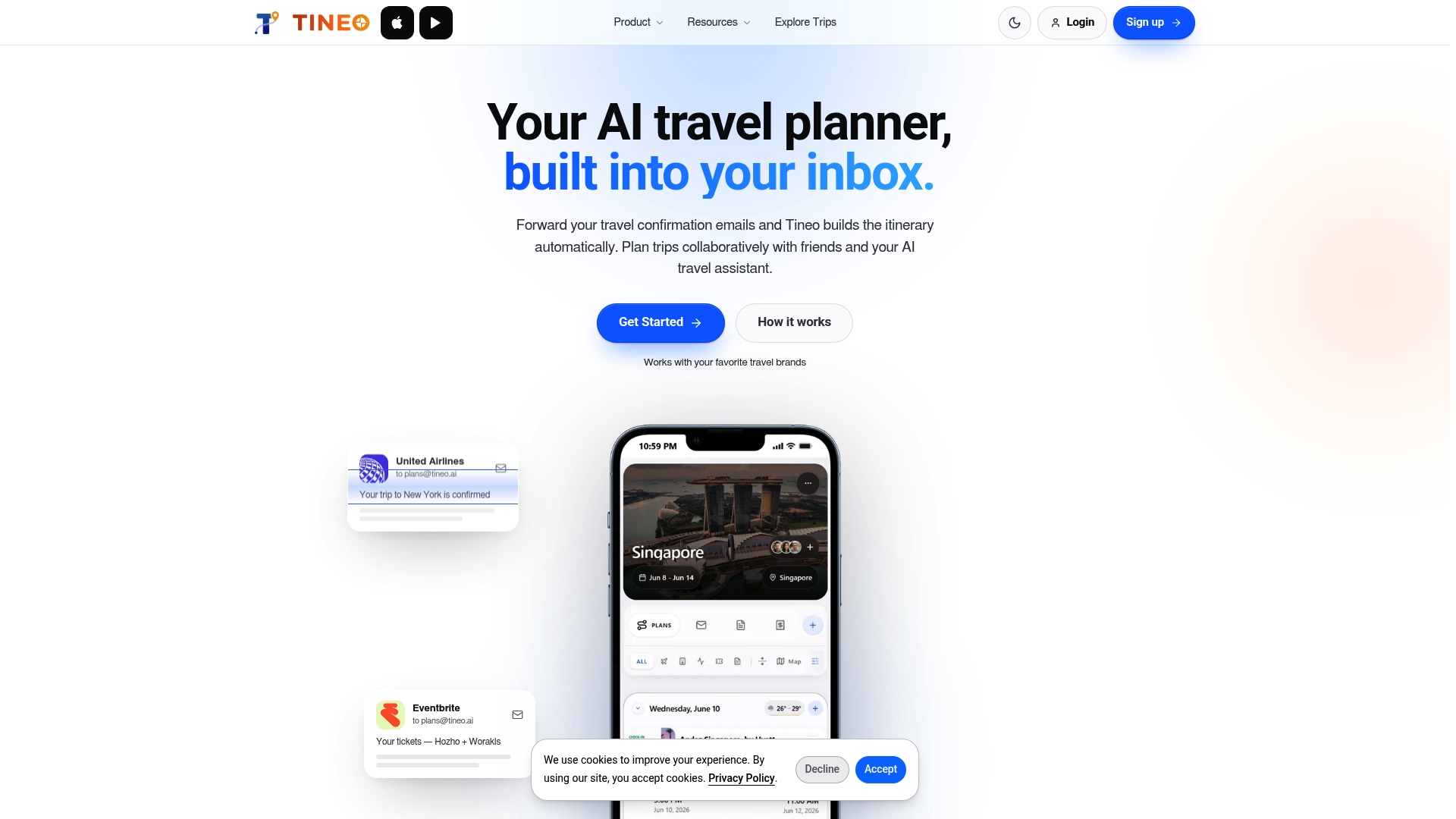
An itinerary manager can auto-import flights, lodging, car rentals, and activity bookings from your confirmation emails, keep everything in a single timeline, and work across web, iOS, and Android so every traveler in your group sees the same plan. Offline access means your itinerary is there even without signal, document storage keeps tickets and passports attached to the right trip, and an AI assistant can answer questions in the context of what you’ve actually booked.
Getting started takes a few minutes:
- Try Tineo Free to import your first trip and see the timeline come together.
- Compare Tineo Ultra for premium AI assistant capabilities and document and trip intelligence on our pricing page.
- Share your trip with travel companions so everyone is working from the same itinerary.
Check out Tineo’s pricing page to see which plan fits your next trip.
FAQ
What is the best website for travel planning?
There’s no single best website for every part of a trip. The most effective approach combines specialist sites for flights, lodging, and activities with an itinerary manager like Tineo that consolidates all your confirmations into one shared trip plan.
What is a good website for planning travel itineraries?
A good itinerary planning tool should auto-import your booking confirmations, show a timeline view of your whole trip, and let you share that plan with travel companions. Features like offline access and document storage, available in Tineo’s app, are especially useful for trips with several bookings.
Is TripIt or Wanderlog better?
Both are established itinerary apps with different strengths: TripIt focuses on email forwarding and auto-import, while Wanderlog adds trip mapping and budgeting tools. The right choice depends on whether you prioritize simple import or more detailed trip mapping, and it’s worth comparing feature sets directly on each app’s own page before deciding, as we do in our comparison of itinerary apps.
Can I use ChatGPT to plan a trip?
A general-purpose chatbot can help brainstorm destinations or draft a rough schedule, but it can also produce inaccurate details on pricing, availability, or opening hours since it isn’t checking a live source. For actual bookings, use tools that pull real-time data from live APIs rather than relying on a chatbot’s generated answer, then verify details directly with the vendor before you pay.
Sources
- Inroads to personalized AI trip planning
- How real-time collaborative editing actually works
- How to book travel with AI Mode in Google Search
- Mobile Passport Control - CBP
- Tripadvisor