

Text Tineo: Your Travel Assistant in iMessage
Text the Tineo assistant from Messages on your iPhone. Ask about your flights and trips, send a booking to add it, bring Tineo into a group chat, and get flight updates by text before you ask.


On this page
Text Tineo puts your travel assistant in Messages. Ask whether your flight is on time, send a booking to add it to your trip, or bring Tineo into the group chat where your friends are planning dinner. It is the same Tineo assistant you chat with in the app, with your trips and flights, now one text away.
The Text Tineo launch film (45 seconds, with sound). Watch or share it directly: landscape 16:9 video or portrait 9:16 video.
Just text it
Type the way you would text a friend. “Is my flight on time?” gets the flight, the times, the terminal and the gate, written so iMessage turns the flight number into a tappable flight card. When the answer is about one trip, Tineo sends the trip link last, so it opens as a preview card right in the thread.
Texting reaches the whole assistant, not a cut-down version. You can:
- Check your plans: flight times and status, what’s next on a trip, or “What’s my plan for today?” while you travel.
- Add to a trip: text “Add flight UA 837 on Dec 4”, or send a screenshot or PDF of a booking and Tineo adds it to the right trip and tells you what it saved.
- Search and pick: ask for a hotel near Alfama for your dates and Tineo replies with a numbered shortlist with prices and ratings. Reply “2” for details and the booking link.
- Get it on paper: “Send me my Lisbon itinerary as a PDF” comes back as a PDF of your trip.
- Handle the small stuff: packing lists, expenses, checklists and the weather where you’re going.
Tineo shows typing dots while it works and answers a plain “thanks” with a heart, like a person would. Before it deletes anything, it asks you to reply YES.
Group chats too
Add Tineo to an iMessage group and the whole group can plan with it. Say “Tineo” anywhere in a message, like “Tineo, find us a dinner spot in Alfama for Friday”, and it answers as a reply to that message. Otherwise it stays quiet.
- Friends don’t need Tineo: anyone in the group can ask, and Tineo answers from the trips of the person who brought it in. Only people who use Tineo can make changes.
- Private things stay private: Tineo never uses documents, passports, boarding passes or your email in a group, and friends never see confirmation numbers or what you paid. It offers to handle those in your own chat instead.
- You’re in control: say “Tineo mute” to quiet it for a day or “Tineo leave” to remove it.
Group chats work when everyone in the group uses iMessage.
It texts you first
Turn on Flight updates and Tineo texts you before you think to ask:
- A briefing about six hours before departure, with your departure time and the latest terminal and gate.
- Gate and terminal changes, as soon as Tineo sees them.
- Delays of 30 minutes or more, with the new estimate.
- Cancellations, with a reminder to check with your airline for rebooking.
Tineo keeps quiet overnight, sends at most a few texts a day, and stops whenever you reply PAUSE ALERTS. Flight updates by text are part of Tineo Ultra and need flight monitoring turned on.
How to set up Text Tineo
- Open Tineo and go to Settings, then Text Tineo. You can also open the assistant menu and choose Set up texting.
- Tap Get started, then Open Messages.
- Send the message Tineo fills in for you. Its link works for 10 minutes. On a computer, scan the code with your phone instead.
- Tineo replies in Messages with a few things to try. Save its contact card so the thread is easy to find.
- To get texts before you ask, turn on Flight updates in the same Text Tineo screen.
Text HELP at any time for help, NEW to start a fresh conversation, or STOP to unlink your number.
Free texts and Tineo Ultra
Every Tineo account can text Tineo. Free accounts get 10 texts a month, and Tineo Ultra makes texting unlimited and adds flight updates by text.
Watch the portrait cut
The portrait cut works best on phones and social feeds.
Portrait 9:16 cut for phones and Stories. Direct links: portrait 9:16 video or landscape 16:9 video.
The film shows a sample trip with made-up people, places and conversations, not real traveler data.
Frequently asked questions
What is Text Tineo?
Text Tineo lets you message the Tineo travel assistant from the Messages app, like texting a friend. It is the same assistant as the chat in the Tineo app, with your trips, flights and bookings, so you can ask a question, add a booking or search for a hotel without opening the app.
How do I set up Text Tineo?
Open Settings in Tineo and choose Text Tineo, or open the assistant menu and choose Set up texting. Tap Get started, then Open Messages, and send the message Tineo fills in for you. The link in that message works for 10 minutes. On a computer, scan the code with your phone instead.
Can Tineo join a group chat?
Yes. Add Tineo to an iMessage group and say “Tineo” in a message to ask it something. It answers from the trips of the person who linked it, stays quiet otherwise, and friends who don’t use Tineo can ask questions too. It never shares documents, passports or boarding passes in a group.
Can Tineo text me first?
Yes, with flight updates by text. Turn on Flight updates under Settings, Text Tineo, and Tineo texts you about six hours before departure, plus when your gate or terminal changes, your flight is delayed by 30 minutes or more, or it is canceled. Flight updates by text need Tineo Ultra and flight monitoring.
Is Text Tineo free?
Every account can text Tineo. Free accounts get 10 texts a month, and Tineo Ultra makes texting unlimited.
Keep reading

Tineo
Smart Check-In: When Check-In Opens and Closes for Your Airline
Tineo Smart Check-In shows when check-in opens and closes for your airline and route, adds airline notes, and opens the airline's own check-in page in one tap.
Tineo
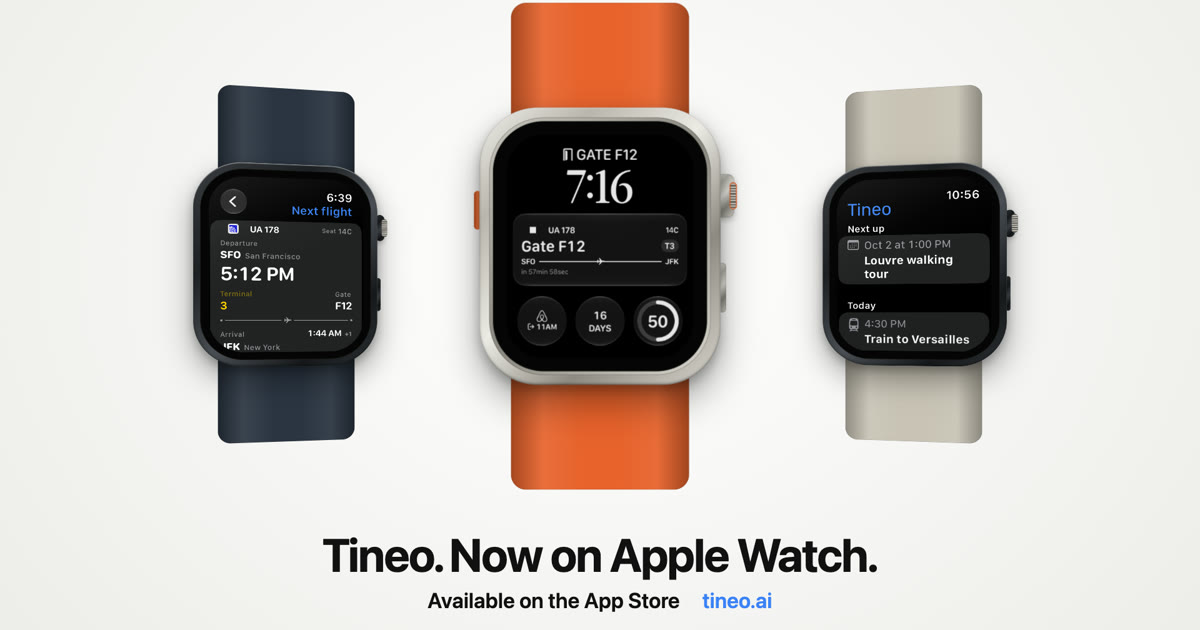
Tineo Is Now on Apple Watch: Flights, Plans and Complications
Tineo for Apple Watch puts your next flight, today's plans, trip countdown and hotel check-out on your watch face. See every complication and what the watch app does.
Flight data
How Often Do Flight Gates Change? About 3 in 10 Flights
In more than a thousand flights saved in Tineo, 31% changed departure gate after it was posted, and 56% of final changes came in the last three hours.