

Splitwise Alternatives for Group Trips: Free Options After the Limits
Hit Splitwise's free-tier limits on a group trip? Compare Splitwise alternatives such as Tricount, Settle Up and Tineo on limits, currencies and what each one keeps free.

On this page
Most people look for a Splitwise alternative at the same moment: day three of a trip, mid-dinner, when the app will not take another expense. This guide compares the main alternatives for group trips on what the vendors say about limits, currencies and price, and tells you what we could and could not confirm.
Tineo publishes this guide and is one of the apps compared, so read that entry with that in mind. Everything below comes from each product’s own pages, read on November 22, 2026, unless it names another source. Apps change their plans often; confirm on the vendor’s page before you commit a group to one.
TL;DR
- Want no limits and no ads: Tricount’s homepage promises “Free. No ads. No limits.”
- Want a free tier plus optional extras: Settle Up’s Google Play listing describes a free app with ads and a Premium upgrade, and says not every group member has to download it.
- Want costs next to the bookings: Tineo keeps a shared expense ledger inside each trip itinerary.
- Staying with Splitwise: its Pro page lists unlimited daily expenses, receipt scanning, itemization, currency conversion and charts. It does not state a price there.
Why people leave Splitwise’s free tier
Splitwise says it is free for iPhone, Android and web. Its Pro page lists, under Pro, “Unlimited expenses” (add as many expenses as you like each day), transaction import (US only), currency conversion, charts and graphs, receipt scanning, itemization, expense search, default split settings and an ad-free app.
What the Pro page does not say is the free limit or the Pro price. A third-party breakdown from Are We Even reports a free cap of 3 expenses per day and Pro at $4.99 per month or $49.99 per year. We could not confirm those figures on Splitwise’s own pages, so treat them as reported, not official.
For a trip, two items matter most: the daily entry limit, because a travel day is many small purchases, and currency conversion, because Splitwise lists it under Pro.
The alternatives compared
| App | What its own page says | Limits and price | Best for |
|---|---|---|---|
| Splitwise | Free on iPhone, Android and web; Pro adds unlimited daily expenses, conversion, receipt scanning | Pro price not stated on its Pro page | Groups already on it |
| Tricount | “Free. No ads. No limits.”; multi-currency support in its site navigation | Free; Premium plan retired | Groups that want a free ledger |
| Settle Up | Works offline; all currencies with real-time rates; not every member needs the app | Free with ads; Premium removes ads and adds receipt photos, categories, recurring entries, Excel export. Price not on the listing | Groups with uneven splits and non-app friends |
| Tineo | Expense ledger inside each trip itinerary | Not listed among Ultra features; Ultra is $4.99 per month or $39.99 per year | Groups that also want one shared itinerary |
Tricount
Tricount’s homepage says it splits expenses on trips or at home and calls itself “Free. No ads. No limits.” It says more than 20 million people use it. Its FAQ explains that the old Premium plan was deprecated with the new app, and lists the features that went away: sorting expenses, exporting to CSV and PDF, personal mode and custom splits (planned for a future update). Tricount is run by bunq, and the homepage also promotes a bunq card that adds expenses automatically, which is an optional extra.
Tricount vs Splitwise
If your only pain is the daily limit, Tricount answers it directly: no limits, no ads. If you need Splitwise’s Pro features, the comparison flips. Receipt scanning, itemization, charts and default splits appear on Splitwise’s Pro page, and none of them appears on Tricount’s homepage. Tricount’s FAQ also tells you what it removed: CSV and PDF export (it offers to export on request through support), and custom splits for now. A fair test is to put one real dinner through both apps with an uneven split before the trip.
Settle Up
Settle Up’s Google Play listing (updated October 19, 2026) says it works on Android, iOS and web, works offline, supports splitting by weights, multiple payers and expenses from a bill, offers all currencies with real-time exchange rates, and does not need every group member to download the app. It also lists CSV export by email as a free feature, and shows “Contains ads”. Premium adds an ad-free experience, receipt photos, categories, recurring transactions, Excel export and group colors. The listing gives no price; check in the app. Its project site describes the same core idea: minimal transactions and even or uneven splits.
Tineo
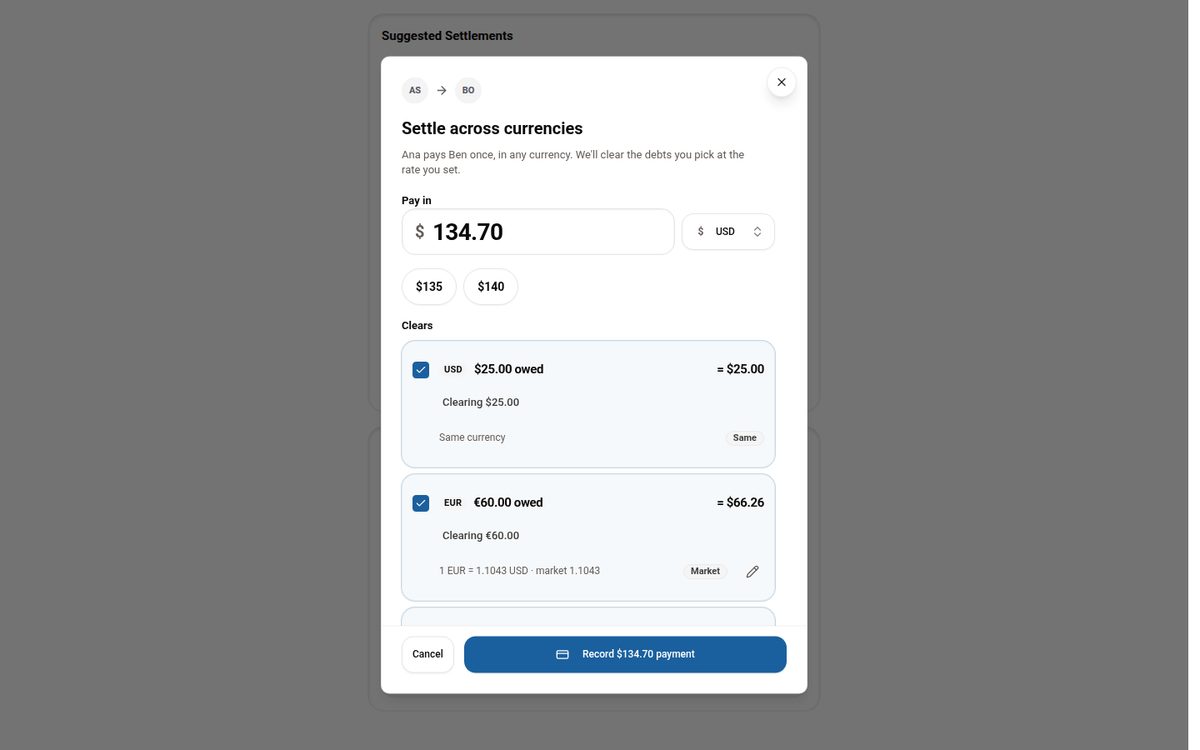
Tineo is an itinerary app first. Forward booking confirmations and they become one shared trip timeline. Every trip also has an expenses tab: record who paid, split equally, by percentage or by exact amounts, see suggested settlements, and record payments. Balances are tracked per currency, and one payment in any currency can clear debts in several currencies at a rate you choose; the multi-currency settle-up guide walks through it. Expenses can be exported to CSV. The trip owner decides whether expenses are shared with every traveler.
What Tineo is not: a payment app (it records settlements, it does not move money), and a smaller ledger than a dedicated expense app, since expenses are one tab of a trip planner. Tineo’s pricing page lists Ultra at $4.99 per month or $39.99 per year for the AI assistant, flight updates, document tools and similar, and does not list expenses there. We found no plan check on the expense features in the product; confirm in the app before you plan around it.
How to choose
- Is the daily limit the whole problem? Try Tricount or Settle Up first.
- Do you have a friend who will not install anything? Settle Up says members need not download the app.
- Do you want the booking amounts and the split in one place? Tineo.
- Do you rely on receipt scanning or itemization? Splitwise Pro lists both; check each alternative’s current features.
- Does the group cross currencies? Read how each app handles rates before the trip; see our guide to multi-currency settle-up.
For a wider look at trip tools beyond money, see the group trip planning apps comparison and our trip expense apps roundup.
FAQ
What is the best free Splitwise alternative for a group trip?
Tricount’s homepage says it is free with no ads and no limits, which makes it the closest match if the daily entry limit is what bothers you. Settle Up has a free tier with ads and a premium tier. Tineo is worth a look if you also want the bookings in the same trip. Check each app’s page for the current terms.
Why does Splitwise stop me adding expenses?
Splitwise’s Pro page lists unlimited expenses, with no daily interruptions, as a Pro feature, which implies the free plan limits how many you can add per day. Third-party write-ups put the free limit at three expenses a day, but Splitwise’s own pages do not state the number, so confirm it in the app.
Is Tricount better than Splitwise?
It depends on what you need. Tricount advertises no limits and no ads. Splitwise’s Pro tier adds receipt scanning, itemization, charts and currency conversion, which Tricount’s homepage does not list. Tricount also retired its Premium plan, and its FAQ says CSV and PDF export, personal mode and custom splits were among the features removed.
Can I move my Splitwise history to another app?
There is no universal import. The practical route is to settle the old group, then start the new trip in the new app. Ask your group to agree on one app before the first expense, not after.
Does Tineo split expenses?
Yes. Each Tineo trip has an expenses tab with equal, percentage and exact splits, per-currency balances and settlements. Tineo does not move money, and the pricing page does not list expenses among its Ultra features. Confirm in the app.
Try the trip ledger inside the itinerary
You can start a trip on Tineo’s free plan at tineo.ai, forward a confirmation, and add a first expense to see whether it fits your group.
Sources
All read November 22, 2026.
Keep reading
Tineo
Settling Group Trip Expenses Across Multiple Currencies
Why per-currency balances make settling up on a multi-currency trip confusing, and how Tineo lets you pay once in any currency and clear the debts you choose.
Group Travel
Best Group Trip Planning Apps: 6 Options and Who Each Suits
Compare six group trip planning apps by the job they do: picking dates, planning on a map, collecting money, splitting costs, and keeping one shared itinerary.
best shared itinerary app
Best Shared Itinerary Apps for Group Trips in 2026
Compare the best shared itinerary apps for friends, families, and colleagues: how each handles bookings, sharing, pricing, and platforms, and which fits your trip.