

Google Trips Shutdown: The Best Alternatives in 2026
Google Trips shut down in 2019, but travelers still need itinerary apps. Compare the best alternatives, including AI-powered trip planners.


On this page
If you’re searching for Google Trips, we have bad news: Google discontinued the app in August 2019. The good news? Better alternatives have emerged that do everything Google Trips did — and much more.
Updated June 13, 2026. Source notes checked against Google’s public Google Trips shutdown coverage, current Google Travel/Maps behavior, Tineo pricing, TripIt Pro pricing, Wanderlog, Tripsy, and Google Takeout. Google has not announced a revived standalone Google Trips app.
What Happened to Google Trips?
Google Trips launched in 2016 as a travel planning companion that could automatically import reservations from Gmail, organize trips by destination, provide offline access to itineraries, and offer destination guides.
In 2019, Google shut down the standalone app, citing a desire to “focus on other travel products.” In practice, they moved a handful of features into Google Maps and Google Search. The seamless, dedicated travel experience was lost.
Google’s official replacement (Google Travel / google.com/travel) is a web-only search tool, not an itinerary manager. It does not organize your bookings or provide offline access.
Does Google have a trip planner today? Google has travel surfaces across Maps, Search, Gmail, and Google Travel, but it does not offer the same standalone Google Trips app. Does Google Maps have a trip planner? Google Maps is strong for saved places, lists, navigation, and route context, but it is not the same as a booking-aware itinerary app that imports confirmations and trip files.
What Google Trips Did Right
- Automatic Gmail import — Reservations appeared without manual forwarding
- Organized itineraries — Everything chronologically in one place
- Offline access — Critical for international travel without data
- Clean interface — Simple and focused, no clutter
- Free — No subscription, no premium tier
What Google Trips Lacked
- AI assistant — Couldn’t ask questions about your trip
- Any-email support — Required Gmail specifically, nothing else
- Real collaboration — Sharing was view-only
- Active development — Google stopped improving it before shutting it down
What Google Trips Users Miss Most
Based on feedback from former Google Trips users:
- Automatic Gmail import — Reservations appeared without forwarding
- Clean, simple interface — Everything in one place
- Offline access — Critical for international travel
- Destination guides — Things to do, places to eat
- It was free — No premium tier or paywalls
The good news: modern alternatives offer all of this and more.
The Best Google Trips Alternatives in 2026
1. Tineo (Best Overall — The True Successor)
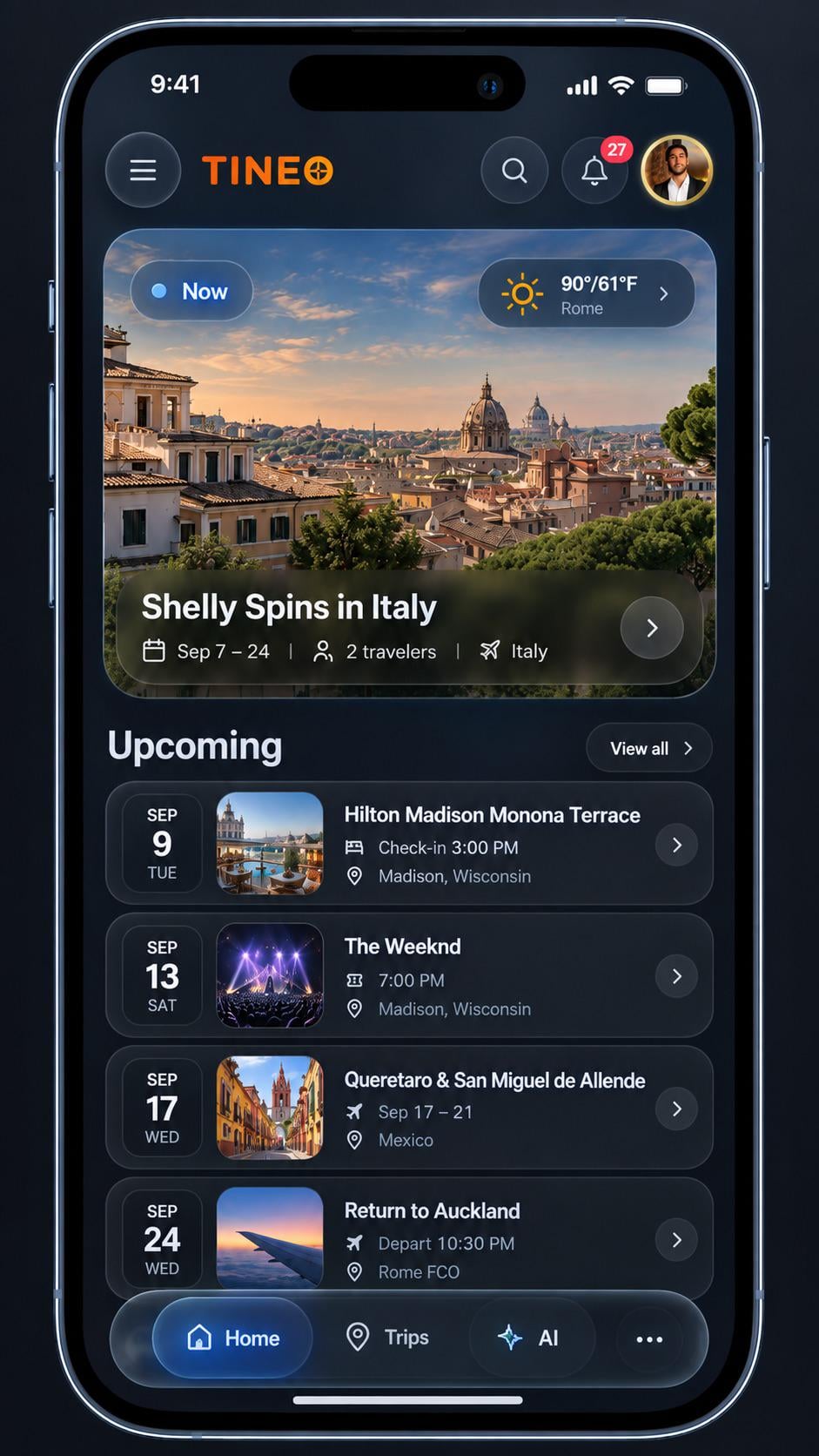
Tineo is what Google Trips should have evolved into. It starts from the same premise — booking confirmations organized into a clean itinerary with offline access — and adds what Google never built.
Scroll sideways to read every column.
| Feature | Google Trips | Tineo |
|---|---|---|
| Email import | Auto from Gmail only | Forward to [email protected] or use connected import when available |
| AI assistant | ❌ | ✅ Conversational, free |
| Offline access | ✅ | ✅ |
| Flight alerts | ❌ | ✅ Free |
| Collaboration | View-only sharing | ✅ Real-time with chat + polls |
| Works with any email provider | ❌ Gmail only | ✅ |
| Price | Free (discontinued) | Free |
What Tineo adds that Google Trips never had:
- AI Travel Assistant — Ask “What time is my flight?” or “What’s near my hotel?” in plain language, and get answers from your actual itinerary
- Any-inbox forwarding — Gmail, Outlook, Yahoo, work email — forward original confirmations to
[email protected]and review the created itinerary items - Real-time collaboration — Multiple people can forward their bookings to the same trip; everyone sees it build live
- Converging flights view — When your group is flying from different cities, Tineo shows all departure points, flight times, and arrival order on one screen
- Real-time flight alerts — Gate changes, delays, terminal info, airport walk times — included free
Best for: Anyone who loved Google Trips and wants a smarter, more capable replacement that works with any inbox.
2. TripIt
TripIt has been around since 2006 and pioneered the email-forwarding approach to itinerary building.
Pros:
- Established, reliable platform
- Good email parsing
- Calendar integration
Cons:
- Dated interface (feels like 2010)
- Flight alerts require Pro ($49/year)
- No AI features
- No real collaboration
Best for: Users who prioritize stability over innovation.
3. Wanderlog
Wanderlog is great if you enjoy the planning process itself.
Pros:
- Beautiful trip boards and map view
- Budget tracking and expense splitting
- Route optimization between stops
- Collaborative editing
Cons:
- Email import requires Pro tier
- No AI travel assistant
- More manual work to set up
Best for: Travelers who want to research and plan trips manually, especially for sightseeing-heavy trips.
4. Google Maps (Limited)
Some Google Trips features live on in Google Maps:
- Saved places
- Timeline of visited locations
- Basic reservation display (if using Gmail)
Cons:
- Not a dedicated travel app
- Limited organization
- No itinerary view
- No flight tracking
Best for: Casual travelers who only need to save places for an upcoming destination.
5. Kayak Trips
Kayak offers a trips feature within their main app.
Pros:
- Email parsing
- Price tracking for bookings
Cons:
- Buried within Kayak’s main app
- Limited features
- Pushy booking suggestions
Best for: Users already loyal to Kayak.
Feature Comparison: All Google Trips Alternatives
Scroll sideways to read every column.
| Feature | Tineo | TripIt Free | TripIt Pro | Wanderlog | Google Maps |
|---|---|---|---|---|---|
| Email import | ✅ Free | ✅ | ✅ | Pro only | Partial |
| AI assistant | ✅ Free | ❌ | ❌ | ❌ | ❌ |
| Offline access | ✅ Free | ❌ | ✅ | ✅ | ✅ |
| Flight alerts | ✅ Free | ❌ | ✅ | ❌ | ❌ |
| Real-time collab | ✅ Free | ❌ | ❌ | ✅ | ❌ |
| Dark mode | ✅ | ❌ | ❌ | ✅ | ✅ |
| Budget tracking | ❌ | ❌ | ❌ | ✅ | ❌ |
| Price | Free | Free | $49/yr | Free/Pro | Free |
How to Migrate from Google Trips
Option 1: Google Takeout
- Go to takeout.google.com
- Select “Trips” data
- Download your archive
- Note: this provides raw data, not directly importable files
Option 2: Start Fresh with Email (Recommended)
The easiest migration path:
- Search your Gmail for old booking confirmations
- Forward them to your new app (e.g.,
[email protected]) - Your itineraries rebuild automatically
Option 3: Manual Recreation
For past trips you want to preserve:
- Create trips manually in your new app
- Add details from your records
Frequently Asked Questions
Is Google Trips coming back? No. Google has shown no indication of reviving the standalone app. Google Travel (google.com/travel) exists as a search surface but is not an itinerary manager.
Can I still access old Google Trips data? You can download your data via Google Takeout (takeout.google.com → select Trips), but the files are raw data rather than importable itineraries. The easiest migration is to search Gmail for old booking confirmations and forward them to your new app — most will rebuild the itinerary automatically.
What is the best replacement for Google Trips?
Tineo is the closest replacement for Google Trips if you want booking confirmations organized into an itinerary with offline access and an AI assistant. It does not recreate Google’s old Gmail-only auto-import exactly; the normal workflow is to forward confirmations to [email protected] or use connected import when available.
Do I have to pay for a Google Trips alternative? You do not have to pay for a Google Trips alternative if you only need core itinerary organization. Tineo has a free core tier, TripIt has a free tier, and other apps vary by platform, limits, and premium features.
Which alternative has the best email import?
Tineo is the best fit if your priority is forwarding booking confirmations from different inboxes into one itinerary. Forward original confirmations to [email protected], then review the created trip items against the source email before travel.
The Bottom Line
Google Trips was ahead of its time but limited by 2016 technology. If you’re still searching for a replacement:
- Want AI + email import + free? → Tineo
- Want the established choice? → TripIt (pay $49/yr for full features)
- Want manual planning control? → Wanderlog
For most former Google Trips users, Tineo offers the closest experience to what you loved — enhanced with the AI capabilities that make modern travel planning genuinely easier.
Ready to find your Google Trips replacement?
Try Tineo free — forward one confirmation email and watch the itinerary build itself.
Keep reading
Travel Apps
Travel Apps That Shut Down: Dates, Data and Replacements
A sourced tracker of trip planner and itinerary apps that shut down since 2017: announcement and closing dates, what happened to user data, and official advice.
Itinerary Apps
Best itinerary apps for frequent travelers: September 2026
Compare TripIt, Tineo, Wanderlog, Tripsy and Stippl by booking import, planning style and device fit. Use a practical checklist to choose your next app.
Let's Jetty
Let's Jetty Alternatives 2026: Best Group Trip Planner Apps
Looking for a Let's Jetty alternative? Compare the best group trip planner apps for RSVPs, polls, itineraries, email import, and offline access.