

Daily Travel Itinerary: 3 Copy Ready Templates and App Import
Three copy ready daily itinerary templates, step by step planning rules, and an app import workflow. Add pacing, meal breaks, buffers, and simple backups.

On this page

The fastest way to build a daily travel itinerary is to grab an editable template and fill in your actual bookings. Google Docs and Word work for a simple shareable agenda, Sheets and Excel handle budgets and durations automatically, and a design template suits a printable keepsake. If you want your plan to stay current without retyping anything, an itinerary manager app can pull the details straight from your booking confirmations. Copy-ready sample layouts and a step-by-step checklist follow below.
TL;DR:
- Use an itinerary manager app for real-time updates and automatic import of booking confirmations, especially for trips with multiple bookings or shared planning.
- Build your schedule around fixed items first, then cluster activities by neighborhood and include transit buffers of 15 to 45 minutes depending on the city.
- Front-load physically demanding sights early in the day to avoid crowds and heat, and sequence activities by geographic proximity for efficiency.
- Incorporate scheduled meal and rest periods of at least 60 to 90 minutes, and add buffer time before major activities to prevent fatigue.
- Adjust plans flexibly for delays or changes by reserving slack and maintaining a backup list of alternative activities and key contacts.
Table of Contents
- Which Template Format Fits Your Daily Travel Itinerary?
- Copy-Ready Daily Itinerary Layouts for Any Pace
- How Do You Build a Daily Travel Itinerary Step by Step?
- What Planning Rules Actually Make a Day-By-Day Itinerary Work?
- When Should You Move From a Document to an Itinerary App?
- Incorporating Meal Breaks and Rest Periods Effectively
- How Do You Adapt a Daily Itinerary to Delays or Changes?
- Balancing Sightseeing With Downtime to Avoid Burnout
- Including Local Events and Seasonal Timing in Your Plan
- Prioritizing Activities by Interest and Energy Level
- Try Tineo to Build Your Daily Itinerary Automatically
- Where to Find More Templates and Example Itineraries
- Sources
- FAQ
Which Template Format Fits Your Daily Travel Itinerary?
Not every trip needs the same tool. The right pick depends on how you plan to share it, edit it, or hand it to someone else at the airport gate.
- Google Docs or Word: best for a clean, printable agenda you can email or drop into a shared drive. No formulas, no clutter, just a readable day-by-day list.
- Google Sheets or Excel: best when you’re tracking costs, splitting bills with travel companions, or need duration math to add up automatically. Large itinerary collections often pair their day-by-day plans with downloadable spreadsheet templates that auto-total budgets and split costs, which saves real time on group trips.
- Design templates (Canva, Adobe Express): best for a polished, printable handout, especially for a wedding weekend, family reunion, or a trip where guests will want a physical copy. Canva’s itinerary templates come pre-formatted so you’re editing text, not building layout from scratch.
Whichever format you choose, build in these fields: date, time, duration, location, booking reference, notes, and a budget column. One editing trick worth knowing: Excel and Sheets both let you insert a line break inside a single cell, so you can stack an address under an activity name without stretching your columns. On a phone, tap into a cell before typing. Most spreadsheet apps auto-expand the row height once you add a line break.
Copy-Ready Daily Itinerary Layouts for Any Pace
Pace matters more than most travelers plan for. A day that looks fine on paper can wear you out if you stack five stops with no breathing room. Itinerary builders that offer relaxed, moderate, and packed presets exist for exactly this reason: they change how many activities land in a single day based on the pace you pick. Here are three ready-to-copy layouts.
- Relaxed day (2 to 3 items): 9:00 AM breakfast near your hotel, 10:30 AM one major sight with a 2 hour buffer, 2:00 PM lunch and rest, 4:00 PM optional second stop. Leave the evening open.
- Moderate day (3 to 5 items): 8:30 AM breakfast, 9:30 AM sight one (90 minutes), 11:30 AM short walk to sight two (60 minutes), 1:00 PM lunch, 2:30 PM sight three, 6:00 PM dinner.
- Packed day (hourly slots): 7:30 AM breakfast, 8:30 AM sight one, 10:00 AM transit and sight two, 12:00 PM quick lunch, 1:30 PM sight three, 3:30 PM buffer for lines or delays, 5:00 PM sight four, 7:30 PM dinner.
Under each slot, log the activity name, address, expected duration, booking reference, and a contact number if there’s a guide or driver involved. That last field matters more than it sounds. It’s the difference between calling a real person and searching your inbox when a tour runs late.
How Do You Build a Daily Travel Itinerary Step by Step?
Building a workable day-by-day plan takes about six moves, in this order.
- Fix your dates, base locations, and pace. Decide upfront whether this trip is relaxed, moderate, or packed. That single decision shapes everything else.
- Add immovable items first. Flight arrivals, hotel check-in times, and prebooked tours go on the calendar before anything flexible. These are your anchors.
- Group activities by neighborhood. Cluster stops that sit near each other on the same day instead of zigzagging across town. Assign each one a realistic duration, not an optimistic one.
- Add transport time and buffers. Budget 15 to 45 minutes between stops depending on the city and how you’re getting around. A subway hop in a dense city needs less padding than a taxi across a sprawling one.
- Attach booking references, addresses, and contacts. Then turn on offline access for that document or app, so you’re not hunting for signal at a train station.
- Share it and agree on one master copy. If two people are editing the same trip, decide who owns the “real” version to avoid three conflicting itineraries by day two.
Pro Tip: Keep one lean backup plan for each afternoon, just two or three flexible options with no fixed time. When a museum closes early or the weather turns, you swap in the backup instead of rebuilding the whole day from scratch.
What Planning Rules Actually Make a Day-By-Day Itinerary Work?
A few sequencing habits separate itineraries that hold up from ones that fall apart by 2:00 PM.
- Front-load demanding visits. City guides built around a single destination consistently schedule the most physically demanding sights early, before crowds build and heat peaks, then save afternoons for neighborhoods and lower-effort stops.
- Sequence by geography, not wish list order. Move through nearby areas in one sweep instead of crossing town and back.
- Cap your hours per pace preset. Relaxed days stay light on purpose; packed days pack in more, but only with real buffers built into the schedule.
- Reserve buffer time for lines and surprises. One reserved hour around a big transition, like a city-to-city travel day, absorbs delays without wrecking the rest of the plan.
On the budget side, a spreadsheet with a running total column does the math for you instead of leaving it to a calculator app at the end of the trip. Front-loading strenuous visits is a small change with an outsized effect: it cuts down on the midday cancellations that happen when a group gets too tired or too hot to push through an afternoon plan.
When Should You Move From a Document to an Itinerary App?
A Google Doc or spreadsheet works fine until your trip has more than a few bookings, or more than one person needs to see updates in real time. That’s usually the moment a document starts to feel like more work than the trip itself.
- Documents and spreadsheets are great for planning and budgeting, but every change (a flight time shift, a new activity) means manually editing the file and re-sharing it.
- An itinerary manager keeps one live version everyone can check, updates automatically when details change, and works offline when you’re between signals.
Tineo, for example, auto-imports booking confirmation emails and organizes flights, hotels, car rentals, and activities into a single trip timeline you can view on web, iOS, or Android. Migrating is straightforward: paste your existing template’s details in manually, or forward your confirmation emails and let the app build the days for you.
A day-by-day plan is only as useful as its last update. The moment a document stops matching reality, it stops being useful, which is exactly the gap an itinerary manager is built to close.
The Tineo Team publishes practical guides on this exact workflow, including a full walkthrough on how to create a travel itinerary from scratch.
Incorporating Meal Breaks and Rest Periods Effectively
Meals aren’t filler time between sights. Treat them as scheduled blocks with the same weight as your main activities, because a rushed lunch tends to derail whatever comes next.
Build in at least 60 to 90 minutes for lunch and 90 minutes to 2 hours for dinner, more if you’re somewhere reservations run slow or the meal is meant to be an experience in itself. Breakfast can be shorter, 30 to 45 minutes, if it’s at your hotel or a quick café stop.
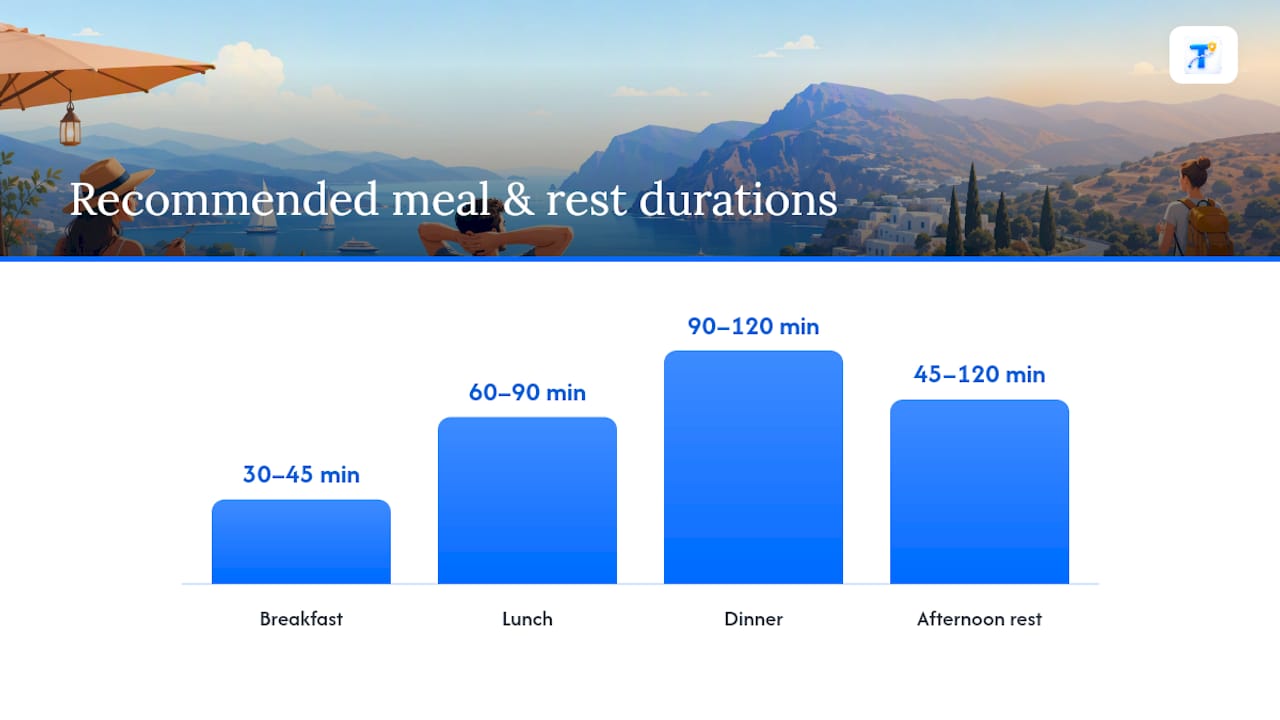
Rest periods matter just as much, especially on trips longer than four or five days. A short block back at the hotel, even just 45 minutes to change clothes and sit down, resets energy for an evening out. This matters more with kids, older travelers, or anyone adjusting to a new time zone. Building a deliberate gap into the afternoon, rather than hoping one naturally appears, is what actually makes it happen.
One underused move: put a rest block before your biggest planned activity of the day, not just after. Arriving at a big dinner reservation or an evening show already tired takes the shine off it. A 30 minute pause beforehand, even just sitting at a café, changes how the whole evening lands. Log these rest blocks in your itinerary the same way you’d log a museum visit, with a start time and rough duration, so they don’t quietly disappear the first time the day runs long.
How Do You Adapt a Daily Itinerary to Delays or Changes?
Plans slip. A flight lands late, a museum closes for a private event, or it rains through your outdoor afternoon. The itineraries that survive this aren’t the most detailed ones, they’re the ones built with slack already in them.
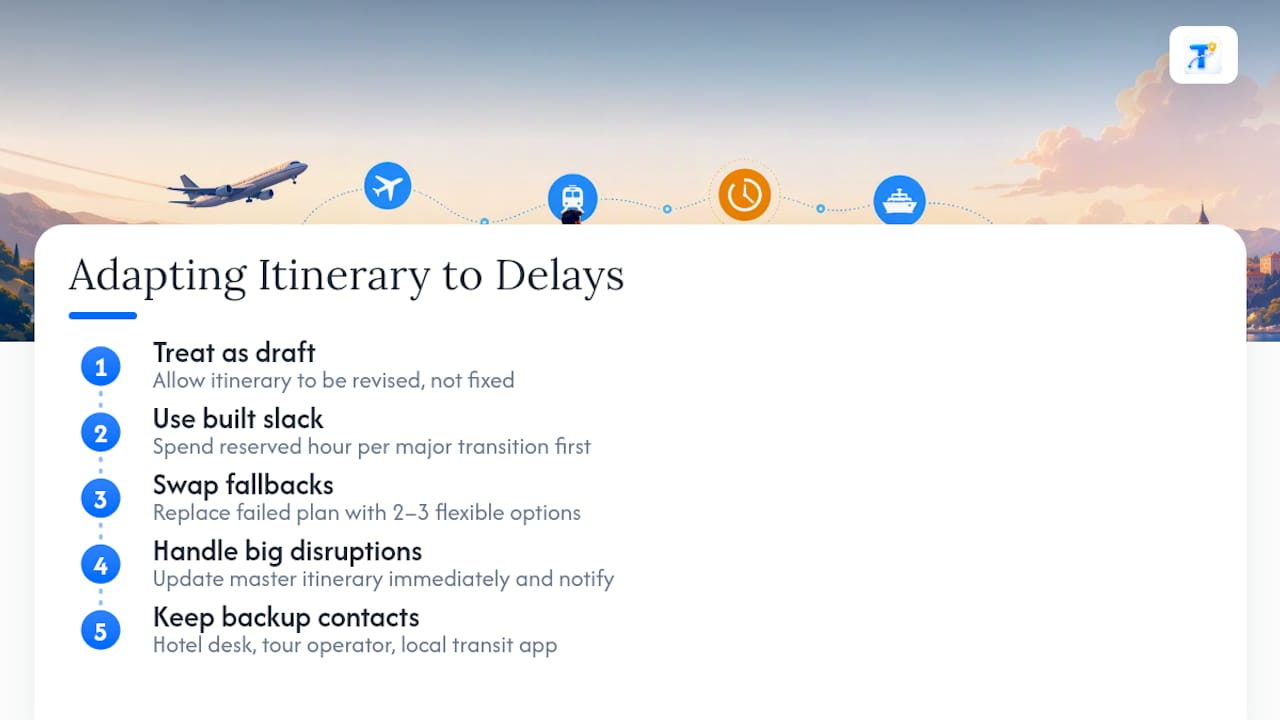
Start by treating your itinerary as a draft, not a contract. If you’ve built in one reserved hour per major transition, as recommended for city-to-city travel days, that buffer is your first line of defense. Use it before you start cutting other plans.
When something falls through, work from your backup list rather than improvising on the spot. The lean afternoon fallback mentioned earlier, two or three flexible, no-fixed-time options, exists for exactly this moment. Swap it in and move on instead of trying to force the original plan back into place.
For bigger disruptions, like a canceled tour or a delayed connecting flight, update your master itinerary immediately rather than waiting until the end of the day. If you’re sharing the plan with travel companions, this keeps everyone looking at the same version instead of three different mental pictures of what’s happening next. An itinerary app with live updates handles this automatically; a shared document needs someone to actually make the edit and re-send it.
Keep a short list of backup contacts, too: your hotel’s front desk, a tour operator’s phone number, or a local transit app. These make the actual recovery faster than the itinerary format itself ever could.
Balancing Sightseeing With Downtime to Avoid Burnout
Burnout on a trip usually isn’t caused by one bad day. It builds from several packed days stacked back to back with no release valve.
The fix is structural, not willpower. If you’re using pace presets, don’t run “packed” for more than two consecutive days without dropping into “moderate” or “relaxed” for a recovery day. This mirrors how itinerary builders design their pace options: a packed day works well as an occasional peak, not as the trip’s default rhythm.
A useful gut check when building each day: cap your hard commitments (timed tickets, tours, reservations) at two or three, and leave everything else open. Open time isn’t wasted time. It’s what lets you linger at a café that turned out to be great, or skip a stop that’s underwhelming without guilt.
Watch for the warning signs, too: if you’re reading your itinerary the next morning and feeling dread instead of excitement, that’s the signal to cut something, not push through it. Trips are more memorable for what you actually enjoyed than for how many boxes got checked.
Including Local Events and Seasonal Timing in Your Plan
A daily itinerary built without checking what’s actually happening in town that week misses free, memorable experiences, and sometimes runs straight into closures.
Before locking in your day-by-day plan, check the destination’s official tourism site or city calendar for festivals, markets, or public holidays during your travel dates. Many attractions close on local holidays with little advance notice on third-party sites, so a quick check against the official source avoids a wasted trip to a locked door.
Seasonal timing shifts your pacing decisions too. Summer heat in southern Europe or the Mediterranean pushes outdoor sightseeing toward early morning, which lines up with the front-loading advice covered earlier. Winter travel in colder climates often means shorter daylight windows, so packed days need tighter time slots and earlier starts. If you’re visiting during a major local event, like a religious festival or a national holiday, expect crowds and adjust your buffer time upward, sometimes by double the usual 15 to 45 minute window.
Building a flexible slot into one evening for “whatever’s happening locally” tends to produce the stories people actually tell afterward.
Prioritizing Activities by Interest and Energy Level
Not every “must-see” on a list actually belongs in your itinerary. The best daily plans start with a filter: does this match what you actually care about, and do you have the energy for it on this particular day?
One workable approach is converting each day into three blocks, morning, afternoon, and evening, and picking one genuine priority per block instead of trying to cram in everything you’ve bookmarked. This keeps each day achievable while still hitting one memorable highlight per stretch, rather than five mediocre ones.
Energy levels aren’t static across a trip, either. Jet lag hits hardest in the first day or two, so schedule lighter, lower-stakes activities early and save your most anticipated stop for when you’re actually rested enough to enjoy it. If you know you’re not a morning person, don’t schedule your highest-priority activity for 8:00 AM just because the guidebook says it’s less crowded then. A slightly busier version of the experience beats missing it entirely because you slept through the alarm.
When two interests compete for the same time slot, ask which one you’d regret skipping more in six months. That question cuts through indecision faster than weighing pros and cons on paper.
Try Tineo to Build Your Daily Itinerary Automatically
Tineo skips the copy-and-paste part of itinerary building entirely: forward your booking confirmation emails, and it organizes your flights, hotels, car rentals, and activities into one shared trip timeline automatically.

That timeline stays current across web, iOS, and Android, and works offline, so a gate change or a delayed pickup doesn’t mean scrambling through your inbox. It’s worth being clear about what Tineo actually does: it organizes and shares the itinerary information you already have, it doesn’t book flights, hotels, or tours on your behalf. The core features are free to start. If you want offline document storage and deeper AI assistance for group trips, the Tineo Ultra plan runs $4.99 a month or $39.99 a year. Check current details and try the free tier on the Tineo pricing page.
Where to Find More Templates and Example Itineraries
For downloadable spreadsheet templates with built-in budget tracking, browse the 100+ free day-by-day itineraries with cost breakdowns. For a real multi-day city example that shows front-loading in action, see the 3-day Athens itinerary. Planning several cities on one trip? A multi-city trip planner sequences your stops to cut backtracking.
Sources
- The Perfect 3-Day Athens Itinerary (2026): Step-by-Step · Todo Athens
- 100+ Free Travel Itineraries with Day-by-Day Plans & Costs
- Trip Itinerary Builder — Day-by-Day Plans | Boarding Gate
- Tripagent
FAQ
How Do I Create a Day Trip Itinerary?
Start with your fixed times (arrival, departure, any prebooked activity), then group the rest by neighborhood and assign realistic durations. Add 15 to 45 minutes of transit buffer between stops, and log addresses and booking references so you’re not searching for details later.
What Is the Best Free Travel Itinerary Planner?
It depends on what you need: Google Docs or Sheets work well if you just want a simple, editable agenda at no cost, while Canva’s itinerary templates suit a printable version. Tineo’s core features, including auto-importing booking confirmations into a shared timeline, are free to use, with current pricing details on the Tineo pricing page.
Does Google Have a Travel Itinerary Template?
Google Docs and Sheets both offer itinerary templates you can copy and edit directly in your account, and Gmail can also surface flight and hotel details it detects in your confirmation emails. For a plan that updates automatically as bookings change, an app like Tineo builds the timeline directly from those same confirmation emails.
How Do I Create My Own Travel Itinerary?
Pick a format that matches your needs, a document for a simple shareable agenda, a spreadsheet for budget tracking, or an app for live updates, then fill in your immovable bookings first. From there, add flexible activities grouped by location, build in meal and rest blocks, and share the finished plan with anyone traveling with you.