

Verify Bookings With an AI Travel Planner Using Tineo in 6 Steps
Use six steps to import, verify, and share confirmed bookings, handle mid trip changes, and test the flow by forwarding one confirmation to Tineo.

On this page

Once your flights, hotel, and rental car are booked, the right AI travel planner is the one that imports your confirmation emails, checks the details against the actual supplier records, and lets everyone on the trip see the same itinerary, streamlining these tasks with AI productivity workflows that save time for travelers. The fastest way to test that is simple: forward one booking confirmation into the app and see whether it comes back as a clean, verified itinerary entry or a guess. An AI travel planner is one option built specifically for this job.
TL;DR:
- Most AI travel planners struggle to verify complex booking details accurately, making manual cross-checking essential before trusting an itinerary.
- Tools should import specific data like passenger names, supplier IDs, and exact dates, not just vague summaries, to ensure trip accuracy.
- Group and multi-city trip planning require clear participant-level views and automatic time zone adjustments to prevent logistical errors.
- AI models can hallucinate details such as times or prices, so always verify critical booking information directly with providers before travel.
- Effective support options and offline document storage are critical features that often vary between free and paid tiers and should be tested beforehand.
Table of Contents
- What Should an AI Travel Planner Actually Do With a Booking?
- How Do You Turn Confirmation Emails Into a Verified Itinerary?
- What Questions Should You Ask Before Trusting an AI Trip Planner?
- Why Do AI Itineraries Sometimes Get Details Wrong?
- How Do AI Planners Handle Group and Multi-City Trips?
- Which Travel Apps Does an AI Planner Actually Connect To?
- Which AI Trip Planners Are Easiest to Actually Use?
- How Good Is Customer Support for AI Travel Planning Apps?
- Try Tineo for Your Next Booked Trip
- Sources
- FAQ
What Should an AI Travel Planner Actually Do With a Booking?
An AI travel planner earns its keep by turning scattered confirmation emails into one accurate, shareable trip record. That sounds simple until you start checking what “accurate” really means, because a lot of tools produce something that looks organized while quietly getting the details wrong.
Here is what to check before you trust any tool with a real, already-booked trip:
- Email and confirmation import. The tool should pull the passenger name record (PNR), supplier name, booking or confirmation ID, and exact dates and times, not just a vague summary like “flight to Denver.”
- Unified timeline and calendar sync. Look for a day-by-day view that adjusts for time zones automatically and flags tight connections, so a short layover doesn’t look identical to a longer one.
- Collaboration controls. You should be able to invite other travelers, decide who can edit versus just view, and leave comments on specific reservations without starting a separate group chat.
- Live updates and change handling. A useful planner flags flight delays or gate changes and links back to the airline or hotel’s own confirmation page, rather than just displaying a static screenshot of the original booking.
- Offline access and document storage. Boarding passes, hotel vouchers, visas, and rental agreements should be viewable without a signal, since that is exactly when you need them most.
- Privacy and data controls. You should be able to see what was imported, delete it, and export your trip data if you decide to switch tools later.
Pro Tip: Import one round-trip flight confirmation first, before anything else. If the tool gets the PNR and flight numbers exactly right, the rest of your itinerary is more likely to be trustworthy as well.
Tineo’s own guide to organizing confirmation emails covers the mechanics of forwarding rules and inbox setup in more depth if you want to see how the import side works before committing to one tool.
How Do You Turn Confirmation Emails Into a Verified Itinerary?
Getting from “a folder full of PDFs” to “a trip I trust” takes six steps, and skipping the verification ones is where most people run into trouble later.
- Gather everything first. Collect flight, hotel, car rental, and activity confirmations, plus passenger details like passport numbers or frequent flyer IDs, in one place before you import anything.
- Import and verify. Connect your inbox or forward confirmations one at a time, then check the parsed fields, PNR, booking ID, dates, and times, against the original supplier email. A tool that leaves a field blank or marked “unconfirmed” is being honest with you; one that quietly fills in a plausible-looking guess is not.
- Enrich the itinerary. Attach PDFs and visas, note pacing preferences (early flights versus late ones), and add personal details like accessibility needs or a client meeting time that the booking confirmation itself never mentioned.
- Share with the right permissions. Invite co-travelers and decide who can edit versus who just needs to view. For a family trip, that might mean everyone sees the itinerary but only one parent can change it. For a work trip, you might assign one person to handle check-ins and another to track reimbursement receipts.
- Turn on monitoring. Enable live flight and hotel updates and set alerts for the changes that actually matter to you, a canceled flight, not a two-minute schedule shift. Decide in advance who in your group is responsible for acting on an alert, so three people aren’t independently calling the airline at once.
- Plan your fallback. Save the airline’s rebooking phone number, your hotel’s direct line, and your travel insurance contact somewhere that doesn’t require an internet connection. If a flight cancels at 6 a.m. local time, you want that number in your notes app, not buried in an email you can’t load.
Pro Tip: Before you leave, screenshot or save offline copies of your confirmation numbers separately from the app. Even the best AI travel planner is only as useful as the connection you have when you need it.
If you want a closer look at the import step specifically, Tineo’s email-to-itinerary walkthrough breaks down what happens between forwarding a confirmation and seeing it appear as a trip entry.
What Questions Should You Ask Before Trusting an AI Trip Planner?
Run through this checklist during a free trial, before you rely on any tool for a trip that matters:
- Does it capture supplier IDs and PNRs reliably, or does it leave placeholders? A tool that flags “PNR not found” is more trustworthy than one that never shows a gap at all.
- Does it surface uncertainty instead of guessing? If a departure time is ambiguous because of a time zone, does the app say so, or does it just pick one?
- How granular are the collaboration controls? Check whether you can give one traveler edit access and another view-only, and whether comments attach to specific bookings or just float in a general chat.
- How does it handle changes and refunds? Some tools link back to the supplier’s own management page for rebooking; a few attempt automated rebooking. Neither approach is universally better, but you should know which one you’re getting before a delay happens.
- What’s actually behind the paywall? Note which features are free and which require a premium tier, especially offline access and document intelligence, since those matter most mid-trip.
- Can you delete your data? Confirm you can remove imported confirmations and export your itinerary if you switch apps later.
A hands-on comparison running the same complex, multi-stop request through several different AI travel tools found real gaps between them, some produced attractive day-by-day layouts while missing basic logistics like connection times or supplier links, according to testing by iMean AI. Visual polish and booking accuracy are not the same thing, and it’s worth checking both separately.
Why Do AI Itineraries Sometimes Get Details Wrong?

AI models occasionally generate plausible-sounding details that aren’t true, a pattern often called hallucination. A model trained to predict likely-sounding text can produce an opening time, a price, or a gate number that reads as confident and specific but was never verified against a real source.
This matters more in travel than in most other uses of AI, because a wrong museum hour is an inconvenience while a wrong PNR or ticket number can strand you. Travel Weekly’s reporting on AI’s limits points out that AI still struggles with the complexity of live operator systems, which is exactly why human oversight matters most for anything booking-critical.
The core distinction to keep in mind: planning outputs are suggestions, confirmed bookings are facts. An itinerary that says “check-in at 3 p.m.” is a plan. A confirmation number that matches what the hotel has on file is a fact. Before you travel, verify:
- Your PNR or confirmation number directly on the airline or hotel’s own site.
- Ticket numbers, especially for connecting flights on separate airlines.
- Local opening hours and time zones, since AI tools can mix up daylight saving changes across regions.
- Prices, which shift constantly and are often stale by the time a model was trained.
Interfaces that feel conversational, like voice assistants, tend to make people less likely to double-check what they’re told, simply because the exchange feels more like a human conversation than a database lookup, based on reporting on ChatGPT’s voice feature. If something goes wrong mid-trip, call the supplier directly, keep your confirmation numbers handy offline, and escalate to a human agent the moment automated rebooking options look unclear.
How Do AI Planners Handle Group and Multi-City Trips?
Group trips and multi-city itineraries are where the gap between AI travel planning tools widens the most. A single flight confirmation is an easy parsing job. Six people flying from four different cities to meet at one resort, with three separate hotel bookings and a rental car split between two drivers, is a genuinely hard coordination problem.
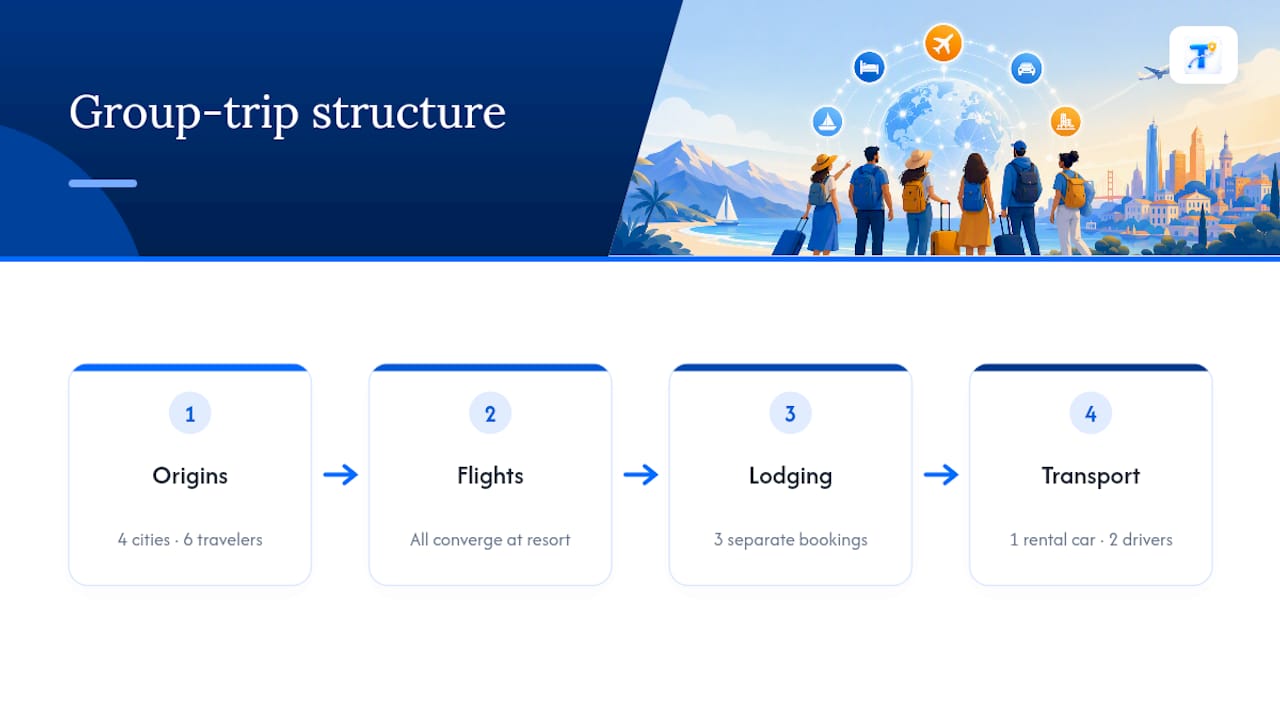
Scenario-based testing across solo, couple, and group trips in a 2026 roundup of seven AI trip planners found real differences in how tools handled that complexity, some held up well for a simple couple’s weekend but lost track of logistics once more travelers and cities entered the picture, according to Monkey Travel’s comparison. The tools that performed best on group trips generally shared one trait: clear participant-level views, so each traveler could see their own flights and lodging without wading through everyone else’s.
Before committing to a tool for a group trip, consider how it displays multiple travelers on the same timeline. Does it merge everyone into one confusing feed, or can each person filter to their own bookings while still seeing shared events like a group dinner or activity? For multi-city trips, check whether the app recalculates time zones and buffer times automatically as you move between destinations, since that’s usually where automated itineraries start to drift from reality.
Which Travel Apps Does an AI Planner Actually Connect To?
Integration is where “AI travel planner” and “travel discovery tool” start to mean different things, and mixing them up leads to disappointment. A discovery tool like TripAdvisor’s TripBuilder helps you find and assemble activities and attractions from scratch. An itinerary organizer is built for the opposite direction: you already have bookings, and you need them consolidated and verified.
Some AI trip planners bridge that gap by connecting to live activity catalogs. GuruWalk’s AI trip planner, for example, builds day-by-day plans from a short questionnaire and links to platforms like ChatGPT or Claude to surface current activity prices and opening times. That kind of connector genuinely improves activity-level accuracy over a model working from memory alone, but it still doesn’t replace checking your actual PNR against the airline’s system once a booking is real.
When you’re evaluating integration claims, ask specifically what the tool connects to: does it pull live flight status from the airline, or just parse the confirmation email once and never check again? Does it link out to your hotel’s reservation page, or just store a static copy of the confirmation? The more specific the answer, the more the integration is worth something.
Which AI Trip Planners Are Easiest to Actually Use?
Ease of use in an AI trip planner comes down to one question: can you find what you need in the middle of a stressful moment, not just when you’re relaxed and planning ahead? A beautifully designed itinerary that takes four taps to reach your gate number is a worse tool than a plain one that surfaces it instantly.
Customization matters here too, but not in the way most marketing pages present it. The useful kind of customization isn’t cosmetic themes or color schemes. It’s whether you can reorder your day, add a personal note like “kids need a nap by 2 p.m.,” or flag which bookings are refundable versus final. Tools that let you annotate individual reservations tend to hold up better on real trips than ones that only let you rearrange a generic template.
Interface comparisons across recent hands-on tests suggest a consistent pattern: tools optimized for visually impressive day-by-day layouts sometimes sacrifice the boring-but-critical logistics, supplier links, connection buffers, PNR fields, that matter most once you’re actually traveling. A clean interface is worth something, but only after you’ve confirmed the underlying data is accurate. Test both separately rather than assuming a polished screen means polished accuracy.
How Good Is Customer Support for AI Travel Planning Apps?
Support quality is easy to overlook when you’re signing up for a free tier, and it’s exactly the thing you’ll wish you’d checked when a flight cancels at midnight. AI travel planning tools vary widely here, from chatbot-only help that recycles generic troubleshooting articles to responsive teams that can look at your specific imported trip.
Before you rely on a tool for a real trip, check what support actually looks like at your subscription tier. Free tiers commonly limit you to help center articles and community forums. Paid tiers more often unlock direct email or chat support, sometimes with faster response commitments. Since availability and features vary by provider and change over time, confirm current support options directly on the product’s help pages rather than relying on marketing claims, which can lag behind what’s actually offered.
The practical test: try the support channel before you need it. Ask a real question about how the app handles a specific edge case, a connecting flight on two different airlines, for instance, and see how clear and specific the answer is. A vague, templated response is a red flag for exactly the moment you’ll need help most, mid-trip, with a real problem.
Try Tineo for Your Next Booked Trip
This AI travel app is built around the workflow this guide walks through: import a confirmation, verify what got parsed, and share the result with whoever else is traveling with you. It pulls flights, hotels, car rentals, and activity bookings out of your confirmation emails and consolidates them into a single trip timeline, accessible from the web, iOS, or Android, so nobody on the trip is stuck screenshotting a PDF to a group chat.

For an already-booked trip, the practical starting point is simple: forward one flight or hotel confirmation into Tineo and check whether the parsed dates, times, and confirmation number match what the airline or hotel has on file. If they do, you have a fast way to build out the rest of your itinerary and invite co-travelers to see it. Collaboration tools let you share the trip with family or colleagues, and document storage keeps vouchers and tickets available offline when you need them most. If you’re switching from a retired tool like TripCase, or from a spreadsheet you’ve outgrown, Tineo’s product page lays out current features, and the what’s new page is the place to confirm the latest capabilities and pricing tiers before you commit to a paid plan.
Sources
This guide draws on hands-on comparisons of AI travel tools, including iMean AI’s multi-tool test, Monkey Travel’s 2026 roundup, and reporting from Seven Corners and Travel Weekly on AI’s practical use and limits in trip planning. For Tineo-specific workflows, see the guides on organizing confirmation emails and importing bookings with AI, plus the comparison of leading AI travel planner apps.
FAQ
Can ChatGPT Build a Reliable Travel Itinerary?
ChatGPT can draft a rough itinerary from a prompt, but it doesn’t import your actual booking confirmations or verify PNRs, so treat its output as a planning starting point, not a confirmed schedule. For chatgpt travel planning, always cross-check flight numbers, times, and prices against the supplier directly.
What’s the Difference Between a Trip Discovery Tool and an Itinerary Organizer?
A discovery tool like TripAdvisor’s TripBuilder helps you find activities and attractions to book. An itinerary organizer like Tineo works after you’ve already booked, importing confirmations into one verified timeline.
How Do I Know if an AI Travel Planner Got My Booking Details Right?
Compare the parsed PNR, confirmation number, and flight or hotel dates directly against the original email or the supplier’s own website. If the app leaves a field blank or flagged as unverified, that’s more trustworthy than a tool that fills in a guess.
Do AI Trip Planners Work Well for Group Trips?
Performance varies significantly by tool once multiple travelers and cities are involved. Look for participant-level views and clear permission controls before relying on any planner for a group booking.
Is It Safe to Store Passport and Booking Details in an AI Travel Planner App?
Check the app’s privacy settings for the ability to delete imported data and export your trip information before storing sensitive documents. Review the specific product’s privacy policy and help pages for current data handling practices rather than assuming a standard across all AI travel planner apps.