

Turn Many Bookings Into One Shared Trip With an AI Itinerary Planner
Organize multi stop group travel by importing booking confirmations into an AI itinerary planner. Learn the import, verify, edit, and share workflow, with...

On this page

Use an AI itinerary planner that imports your booking confirmations directly into a shared trip timeline. For a multi-destination group trip, that means importing every confirmation, checking time zones and dates for conflicts, and sending co-travelers one link instead of a folder of forwarded emails. Start by forwarding your existing booking emails or uploading confirmations to build the itinerary now.
TL;DR:
- Import confirmations from all travel providers to ensure a comprehensive and accurate trip timeline, especially for multi-destination group itineraries.
- Reconcile dates and times carefully to prevent scheduling conflicts caused by time zone differences or overlapping reservations.
- Add any missing details like local transit, tickets, or reservations made by phone to complete the itinerary accurately.
- Share the full trip plan through collaborative, real-time links rather than static files to ensure everyone has the latest updates.
- Regularly update and verify bookings during delays or schedule changes to avoid cascading missed connections or outdated information.
Table of Contents
- What Does an AI Itinerary Planner Actually Do?
- How Do You Build an Itinerary From Multiple Bookings?
- How Do You Share an Itinerary With a Group?
- What Happens When a Flight Gets Delayed or Canceled?
- How Tineo Handles This Workflow
- Is It Safe to Import Your Booking Emails Into an AI Planner?
- Try This Workflow With Tineo
- Sources
- FAQ
What Does an AI Itinerary Planner Actually Do?
An AI itinerary planner reads your booking confirmations and turns them into a structured trip, but it works within real boundaries you should know upfront.
Inputs it can typically handle:
- Email confirmations forwarded from airlines, hotels, and car rental companies
- Booking references or PDF attachments uploaded manually
- Manual entries for reservations that never generated a confirmation email
- Traveler profiles, so the system knows who’s on the trip and who’s responsible for what
Outputs you should expect:
- A day-by-day timeline showing flights, lodging, and activities in order
- Reservation cards with confirmation numbers, addresses, and check-in or departure times
- Maps showing where each stop sits relative to the next
- Export options and a shareable link for anyone joining the trip
Product pages across the category, including Mindtrip’s positioning as an AI travel agent, consistently market this same combination: parse a confirmation, build a day-by-day plan, let others view it. But limits are real. Live pricing shown during import is a snapshot, not a guarantee. Opening hours attached to activities can be outdated. And an AI parser can misread an ambiguous confirmation, especially one with unusual formatting or a rebooked itinerary buried in the same email thread as the original.
How Do You Build an Itinerary From Multiple Bookings?
Here’s a labeled example: a trip lasting several days for a small group of travelers, flying into Lisbon, taking a train to Porto, renting a car to drive the Douro Valley, then flying out of Porto. Bookings came from several different airlines and platforms, plus train and car rental confirmations, each landing in a different inbox.
1. Gather every confirmation before you import anything. Pull together the flight into Lisbon, the flight home from Porto, the hotel in Lisbon, the train ticket to Porto, the car rental confirmation, and the Douro Valley lodging booking. Note who booked what. If one traveler booked the train under their name only, flag that now, since it affects how the reservation gets assigned later.
2. Import or forward each confirmation and let the parser work. Forward booking emails to your itinerary planner’s import address, or upload the PDFs directly if the confirmations arrived that way (a rental car voucher, for instance, often comes as an attachment rather than inline text). The step-by-step process for turning email confirmations into a trip walks through exactly how this import step works in Tineo. Let the AI parse each one into a timeline entry before you touch anything manually.
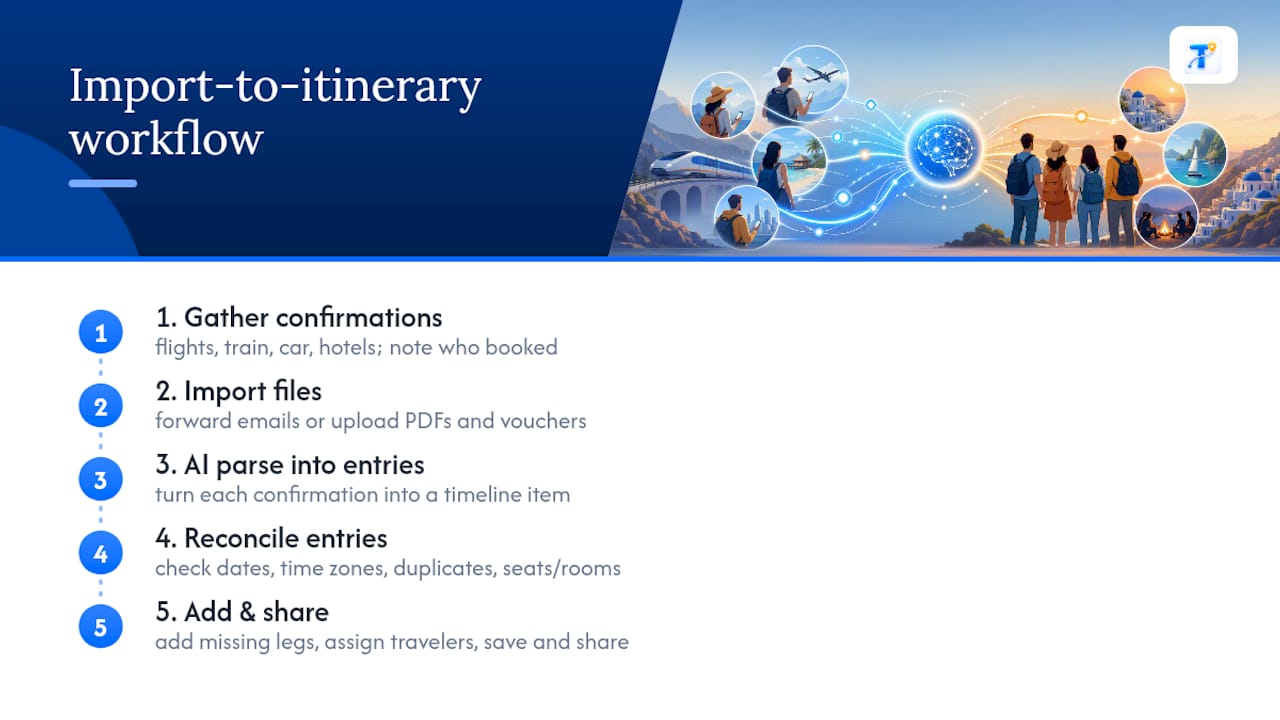
3. Reconcile dates, time zones, and duplicates. This is the step people skip and regret. Check that the Lisbon arrival time and the train departure time from Lisbon to Porto actually leave enough of a buffer. Confirm the AI didn’t create two entries for the same hotel because a rate-change confirmation email arrived after the original booking. Verify seat assignments and room types match what was actually booked, not just what the parser guessed from the subject line.
4. Add what wasn’t in any confirmation email. Local transit from the Porto train station to the car rental counter, museum tickets bought separately, a dinner reservation made by phone. Assign each leg to a traveler, so it’s clear who’s holding the car rental voucher and who has the train tickets. Add notes where a decision needs context, like “flight home is the earliest available, don’t try to change it.”
5. Save, set alerts, and share. Turn on notifications for flight status changes and check-in windows, then export or share the itinerary so every traveler sees the same version.
Pro Tip: Import your train and car rental confirmations even when they feel like an afterthought. Those are the two reservation types most likely to arrive as oddly formatted PDFs, and they’re also the two most likely to get left out of a manually built itinerary until it’s too late to fix a scheduling conflict.
How Do You Share an Itinerary With a Group?
Group trips fall apart when five people are working off five different versions of the plan. The fix is straightforward: invite collaborators into the trip itself rather than emailing a PDF around every time something changes.
- Invite each traveler and set their role, view-only for people who just need the schedule, edit access for anyone making changes
- Keep one owner per trip who has final say on edits, so two people don’t overwrite each other’s updates to the same reservation
- Assign responsibility for specific legs, for example “Emma handles hotels” or “Marcus owns the rental car paperwork,” so accountability is clear
- Use a shared notes section or comments for decisions that need a record, like why the group picked a later flight, instead of scattering that context across text messages
Avoid exporting separate static files for each traveler. A collaborative approach echoes what platforms like TripAdvisor’s My Trips built for personal trip organization years ago, but a live shared itinerary beats a saved list because everyone sees updates the moment they happen, not just the version that existed when the file was exported.
What Happens When a Flight Gets Delayed or Canceled?
Changes are where an AI itinerary planner earns its keep, or exposes its limits. A tool that only builds the initial timeline and never updates it isn’t much better than a spreadsheet.
- Some changes get caught automatically through email re-imports or flight status feeds; others need a manual edit, especially if an airline sends a schedule change buried in a newsletter-style email that doesn’t parse cleanly
- When one leg shifts, check every downstream item. A delayed flight into Porto can blow past a train connection or a rental car pickup window, so update those entries and notify collaborators immediately rather than assuming they’ll notice on their own
- If the AI suggests an alternative flight or hotel, verify availability and current pricing directly with the airline or property before booking anything. Broadcast coverage of AI travel tools has flagged this same gap: CNBC’s look at new AI tools entering the travel industry notes that speed gains come with real risk of stale pricing or errors that need a human check
Reporting from The New York Times on AI trip planners makes the same point directly: these tools speed up the planning process, but travelers still need to verify details like opening hours and live bookings before relying on them. Treat the AI’s first pass as a draft, not a final answer, especially once a trip is already underway and every hour matters.
How Tineo Handles This Workflow
Tineo builds directly around the booking-to-itinerary process described above, rather than asking you to manually rebuild a timeline from scratch.
- Tineo auto-imports booking confirmations for flights, hotels, car rentals, and activities into a single trip timeline, so the Lisbon-to-Porto example above reflects an actual product workflow, not a hypothetical
- The trip is typically accessible on web, iOS, and Android, with some apps offering offline access for viewing details after you’ve landed and lost signal.
- The help resources for importing confirmation emails walk through the import step in detail, and the product updates page tracks new collaboration and import capabilities as they roll out
Following the same five-step sequence gathering confirmations, importing them, reconciling dates and time zones, filling gaps, and sharing works the same way whether you’re managing the trip inside Tineo or building it manually. The difference is how much of steps two and three the AI handles for you before you start reviewing.
Is It Safe to Import Your Booking Emails Into an AI Planner?
Forwarding a flight confirmation or a hotel booking into a third-party app means handing over personal data: your name, travel dates, payment confirmation numbers (though rarely full card numbers), and sometimes passport details if a hotel included them in a confirmation email.
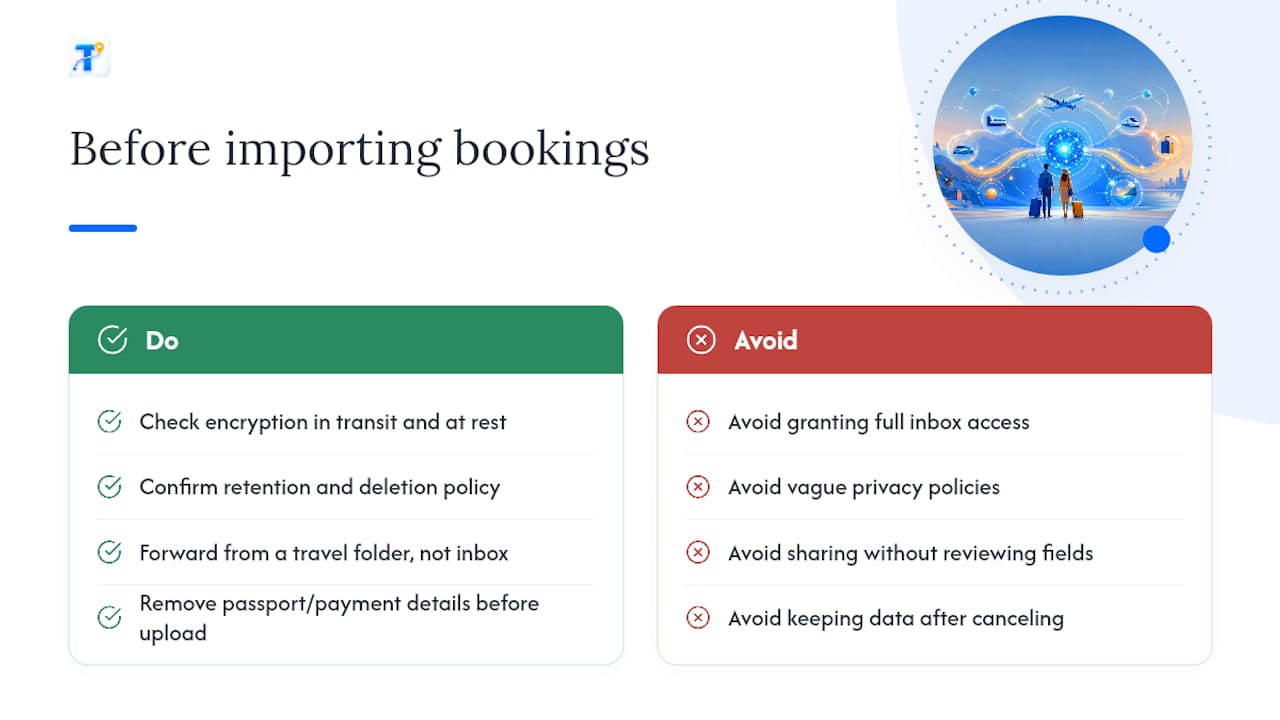
Before importing, check a few things. Look for whether the planner encrypts data in transit and at rest, whether it states a retention policy for confirmations you’ve deleted, and whether it shares data with third parties for advertising. A privacy policy that’s vague about any of these is a signal to dig further before you connect a real inbox.
Practical habits reduce exposure regardless of which planner you use. Forward confirmations from a dedicated travel folder rather than granting an app full inbox access when a forwarding option exists. Remove passport numbers or full payment details from a confirmation before uploading it if the platform doesn’t need them to build your timeline. And check what happens to your data if you cancel a subscription, since a genuinely privacy-respecting service should let you delete your trip history along with your account, not just deactivate the login.
Group trips add a wrinkle: sharing an itinerary with collaborators can also share personal details like a traveler’s frequent flyer number or home address if that information came through in the original confirmation. Review what’s visible to shared collaborators before sending the link, and edit out anything a co-traveler doesn’t need to see.
Try This Workflow With Tineo
If the walkthrough above sounds like more organization than you’ve ever managed to pull off with forwarded emails and sticky notes, that’s the actual problem Tineo was built to solve, turning the confirmations already sitting in your inbox into one editable trip instead of five scattered ones.

Start small: forward one recent booking confirmation, or import an existing trip’s emails, and see the timeline it builds before committing to anything bigger. Tineo Free covers basic import and sharing at no cost, allowing you to try this workflow with your own bookings. For frequent travelers seeking offline access, document storage, and advanced AI assistance, Tineo Ultra offers these features with subscription options available monthly or annually.
One clarification worth stating plainly: Tineo organizes the bookings you’ve already made and helps your group manage them together. It does not book flights, hotels, or rental cars on your behalf, and it won’t guarantee that a suggested alternative during a delay is still available at the price shown. You still make the call, and you still book it yourself.
Sources
Coverage of the AI trip-planning category from TechCrunch and Skift outlines how these products position parsing and collaboration features. The New York Times and CNBC cover the tradeoffs and verification steps travelers should expect. Tineo’s own blog and help pages detail current import and collaboration steps.
- Mindtrip raises funding to build an AI travel agent — TechCrunch
- Coverage of AI planners and traveler cautions — The New York Times
FAQ
What Is the Best AI for Planning a Trip Itinerary?
There’s no single tool that fits every trip, but the strongest option for most travelers is one that auto-imports your actual booking confirmations rather than generating a generic plan from scratch. Tineo is built specifically around that import-and-organize workflow for multi-destination trips.
Can I Use ChatGPT to Plan a Trip?
You can use ChatGPT to brainstorm destinations, draft a rough day-by-day outline, or suggest activities based on your interests. It doesn’t import your actual booking confirmations or track live flight and hotel data, so you’ll still need a dedicated itinerary tool to organize real reservations and share them with travel companions.
Is There a Free AI Itinerary Maker Available?
Yes. Tineo Free covers basic confirmation imports and itinerary sharing at no cost, which handles most single or multi-stop trips without a subscription. Paid tiers add offline access and deeper AI assistance for travelers who want more.
Is There a Free AI Route Planner Available?
Free tools exist for mapping driving routes between stops, and some itinerary planners include basic routing between destinations as part of the trip timeline. For a road trip leg specifically, a dedicated guide like this Cleveland-to-Pittsburgh road trip planning resource can help with route logistics that a general itinerary app won’t cover in detail.
How Do I Fix a Duplicate Entry After Importing Confirmations?
Most AI itinerary planners create a duplicate when a rate change or rebooking confirmation arrives after the original booking email. Check the confirmation numbers on both entries. If they match, delete the older version and keep the timeline entry with the most recent details.