

Best Apple Watch Travel Apps 2026: 8 Compared
Flighty, TripIt, Tripsy, Tineo, Google Maps, Citymapper, Transit and Elk compared for Apple Watch, from each app's App Store listing. Checked November 13, 2026.

On this page
The short answer: for flights on your wrist pick Flighty, for a whole itinerary pick Tineo or TripIt, and Tripsy if you live on Apple devices. For getting around, Google Maps gives directions to saved places, and Citymapper or Transit cover public transport. Elk handles currency conversion with the Digital Crown.
Checked on November 13, 2026. Tineo publishes this guide and is one of the eight apps. What we say about another app comes from its US App Store listing or its own help pages, read on that date and linked below. Many listings confirm that an Apple Watch app exists without describing what it does. Where that is the case we say so and do not fill the gap. We did not test these apps side by side.
Table of Contents
- The eight apps at a glance
- Flights and itineraries
- Getting around
- Money
- Travel apps without an Apple Watch app
- Which ones should you install?
- FAQ
- Sources
The eight apps at a glance
Prices are US App Store prices in US dollars, as listed on November 13, 2026. Stores often list several prices for one plan.
| App | Job on a trip | Needs | What the watch does, as stated | Cost, as stated |
|---|---|---|---|---|
| Flighty | Flight tracking | watchOS 11 | Apple Watch app in the free version. Complications in Pro | Free version. Pro $59.99 a year |
| Tineo | Whole itinerary | watchOS 26 | Five complications, plus flight, stay and plan details in the watch app | Free plan. Ultra $4.99 a month or $39.99 a year |
| TripIt | Whole itinerary | watchOS 10 | Release notes mention an Apple Watch app and complications. Details not stated | Free app. TripIt Pro $48.99 a year |
| Tripsy | Whole itinerary | watchOS 10 | Listing says it is available on Apple Watch. Features not stated | Free download. Pro from $39.99 a year on the listing |
| Google Maps | Directions | watchOS 9 | Step-by-step directions to saved shortcuts, and ETA | Free |
| Citymapper | City transit | watchOS 10 | Listed for Apple Watch. Features not stated | Free app. Club from $1.49 |
| Transit | City transit | watchOS 10 | Listed for Apple Watch. Features not stated | Free app. Royale from $2.99 a month |
| Elk | Currency | watchOS 9 | Convert by tapping, swiping and turning the Digital Crown | Free app. $1.99 a month or $9.99 a year |
Flights and itineraries
Flighty
Flighty is a flight tracker for Apple devices. Its App Store listing puts the Apple Watch app in the free version and Apple Watch complications in Flighty Pro, alongside Live Activities and delay predictions. Pro is listed at $59.99 a year, $9.99 a month or $299 as a lifetime purchase.
Pick it when flights are the part of travel you worry about and you want delay warnings early. It does not organize hotels or activities.
Tineo
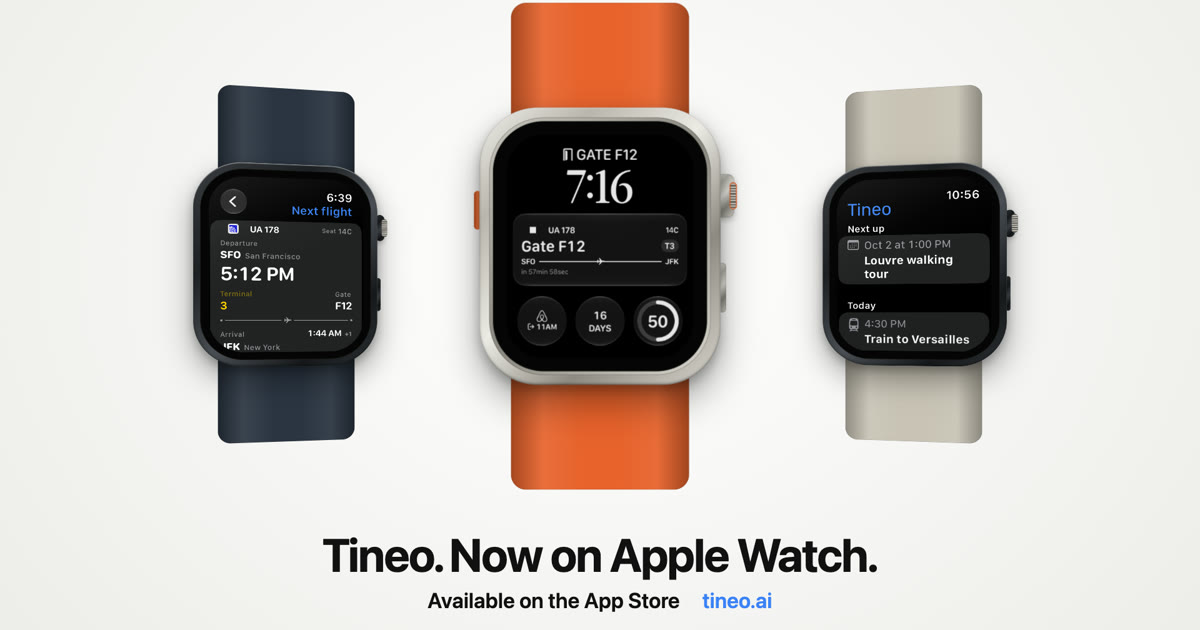
Tineo builds an itinerary from your booking confirmation emails and shows it on the watch. The Apple Watch app has five complications: Next Flight, Next Up, Today’s Plans, Trip Countdown and Current Stay. When live flight data is available, Next Flight shows gate and terminal, gate changes, delays, boarding and the baggage belt. Without live data it shows scheduled details and labels them as scheduled. The watch app holds flight details, your stay with check-out time and address, and today’s and tomorrow’s plans. Trips you have downloaded stay on the watch offline.
What to check first: it needs watchOS 26 or later and Tineo 1.7.2 or later on your iPhone, which is newer than the other apps here require. Trips reach the watch from the iPhone app. Tineo is not a dedicated flight tracker, so Flighty is the better pick if you want delay predictions.
TripIt
TripIt organizes forwarded confirmation emails into a trip. Its App Store listing includes Apple Watch with watchOS 10, and its release notes say the “app for Apple Watch and complications make it easy to get your travel plans at-a-glance”. The listing does not describe the watch features further. Real-time flight status alerts are listed under TripIt Pro at $48.99 a year.
Pick it when you already keep your trips in TripIt, or your watch runs an older watchOS.
Tripsy
Tripsy’s listing says it is available on iPhone, iPad, Mac and Apple Watch, and requires watchOS 10. It describes flight updates for delays, gates, terminals and baggage claims, and offline itinerary access, without saying which of these reach the watch.
Pick it when all your devices are Apple and you like planning a trip by hand as well as importing bookings.
Getting around
Google Maps
Google’s help page for Apple Watch says you can tap a saved shortcut on the watch, such as Home or Work, to get step-by-step directions, check the ETA of your current trip and set your travel mode. For a new destination you start navigation on your iPhone and the directions then appear on the watch.
Pick it when you already navigate with Google Maps. The practical tip for travel: save your hotel as a shortcut on the iPhone before you go out.
Citymapper and Transit
Both are public transport apps with Apple Watch listed on the App Store, at watchOS 10. Neither listing describes what the watch app shows, so we cannot tell you from the listings alone.
What the listings do say: Citymapper names cities including New York City, Chicago, Los Angeles, San Francisco and Washington DC, with “many more worldwide”, and mentions offline access to official transit maps such as the NYC subway map. Transit says it covers public transit in more than 1,000 cities.
Pick Citymapper or Transit according to which one covers the city you are visiting. Check each app’s city list before you travel.
Money
Elk
Elk is a currency converter. Its listing says “On Apple Watch, you tap, swipe and rotate the Digital Crown to convert currencies.” It requires watchOS 9. A subscription is listed at $1.99 a month or $9.99 a year. What the subscription adds, and whether rates are available offline, is not stated in the listing’s description.
Pick it when you are paying in a currency you do not know well and want the answer without taking out your phone.
Travel apps without an Apple Watch app
It helps to know where not to look. On the US App Store listings we read on November 13, 2026:
- Flightradar24 and FlightAware list iPhone, iPad and Apple Vision. Apple Watch is not listed.
- Wanderlog lists iPhone, iPad, Mac and Apple Vision. Apple Watch is not listed.
- Plane Finder does list Apple Watch, at watchOS 10.6, if you want a map-style flight tracker on the watch. Its listing does not describe the watch features.
For flight trackers in general, see our guide to the best flight tracker apps.
Which ones should you install?
A watch face has few slots, so pick by job:
- One itinerary app: Tineo if you want documented complications for flights, plans and your stay. TripIt if you are already there or on an older watchOS. Tripsy if you are all Apple.
- One flight app, if you fly a lot: Flighty.
- One transit app: Citymapper or Transit, whichever covers your city.
- Google Maps for directions back to the hotel.
- Elk if you are changing currencies.
FAQ
What is the best Apple Watch app for flights?
Flighty is the dedicated pick: its App Store listing includes an Apple Watch app in the free version and watch complications in Flighty Pro. Tineo puts your next flight on the watch face as part of a full itinerary, and TripIt’s release notes describe an Apple Watch app with complications.
Which travel apps have Apple Watch complications?
Tineo documents five complications: Next Flight, Next Up, Today’s Plans, Trip Countdown and Current Stay. Flighty lists Apple Watch complications under Flighty Pro. TripIt’s release notes mention complications without listing them. The other listings we read do not describe complications.
Does Google Maps work on Apple Watch?
Yes, with limits. Google’s help page says you can start navigation to a saved shortcut from the watch, follow step-by-step directions and check your ETA. Navigation to a new destination has to be started on your iPhone first.
Do Flightradar24 and FlightAware have Apple Watch apps?
The US App Store listings we read on November 13, 2026 list iPhone, iPad and Apple Vision for both apps and do not list Apple Watch. Plane Finder’s listing does include Apple Watch.
Sources
All read on November 13, 2026.
- Flighty on the App Store
- Tineo on the App Store
- TripIt on the App Store
- Tripsy on the App Store
- Google Maps on the App Store
- Use Google Maps on your Apple Watch, Google Maps Help
- Citymapper on the App Store
- Transit on the App Store
- Elk on the App Store
- Flightradar24 on the App Store
- FlightAware on the App Store
- Wanderlog on the App Store
- Plane Finder on the App Store
Recommended
Keep reading
Tineo
Tineo Is Now on Apple Watch: Flights, Plans and Complications
Tineo for Apple Watch puts your next flight, today's plans, trip countdown and hotel check-out on your watch face. See every complication and what the watch app does.
Claude connectors for travel
Best Claude Connectors for Travel 2026: 9 Compared
Expedia, Kiwi.com, Booking.com, Trivago, Tripadvisor, Viator, Resy, Turkish Airlines and Tineo compared from their Claude directory listings. Checked November 13, 2026.
best flight tracker app
Best Flight Tracker Apps 2026: 7 Compared
Flightradar24, FlightAware, Flighty, Plane Finder, byAir, Aviate and Tineo compared on alerts, platforms and price, from each app's own listing. Checked November 13, 2026.